Posted on — Leave a comment

Help That Helps: Improving the User Experience

As a rule, a website should be self-explanatory; no help required. However there are cases where your customers (I prefer that to “users”) will need your help. Introducing new concepts; changing the interaction; and explaining a complex system are all opportunities to either serve your customer or leave them hanging.

In these cases, help should be readily available when you need it, and unobtrusive when you don’t.

Here are a couple of great examples of online help that really works.

When Facebook introduced their recent changes to the profile page, they offered a tour of the changes that highlighted each new feature without taking you away from your profile. This is awesome, because essentially the guide uses your own profile as an example rather than a generic “Joe Facebook.” The data and examples are all relevant to you because they are yours!

Xero.com is a cloud-based accounting system for business. Accounting is complex, and people tend to be a bit touchy about getting the numbers right, especially when it comes to their own money!

Xeno has done several things really well. They use a “welcome block” to put additional help right in front of new customers. They offer inline, contextual help that doesn’t take your focus from the current page. And they provide links to a more traditional, full-featured help or even live support when you need it.

Another nice touch? Note how the help is clearly identified throughout Xeno with the color orange. The customer will intuitively know when they are looking at help and when they are looking at part of their web app.

Have you seen or designed a great help system? Share it in the comments!

Posted on — 2 Comments

Flipboard: The Number 1 Must-Have iPad App

My iPad has officially replaced my trusty Moleskine notebook. Instead of paper and pen, my iPad comes to my meetings, to Starbucks, and pretty much everywhere I go. There are a lot of wonderful apps for the iPad, and I’ll get into them in good time. But one app really stands out in it’s design, beauty and function — Flipboard.

I first read about Flipboard months before I finally plunked down the cash for an iPad, and it had already captured my attention. It’s remarkable in that Flipboard really doesn’t do anything that I couldn’t do before.

What is Flipboard?

Essentially, Flipboard is a different way of reading and consuming media that I’ve already been reading and consuming via other means. What makes Flipboard remarkable is that it does it so elegantly.

Flipboard transforms Twitter, Facebook, Flickr, Google Reader and RSS feeds into a beautiful, magazine-like interface that leverages all the good bits of the iPad. A Twitter stream is noisy and difficult to browse. The same stream through Flipboard is a pleasure. Links, photos and videos show up inline without requiring extra clicks, making browsing your streams not only a pleasure, but making it possible in a new way.

Here are a few screenshots to help tell the Flipboard story. Click any thumbnail to browser the larger images.

I still use Twitter and Facebook, but reading the same streams via Flipboard never fails to surface new and interesting conversations that I might have otherwise overlooked.

If you have an iPad, you must download and use Flipboard. Hell, it’s free.

If you don’t have an iPad, Flipboard might be reason enough to get one.

Posted on — 4 Comments

What is Personal Knowledge Management?

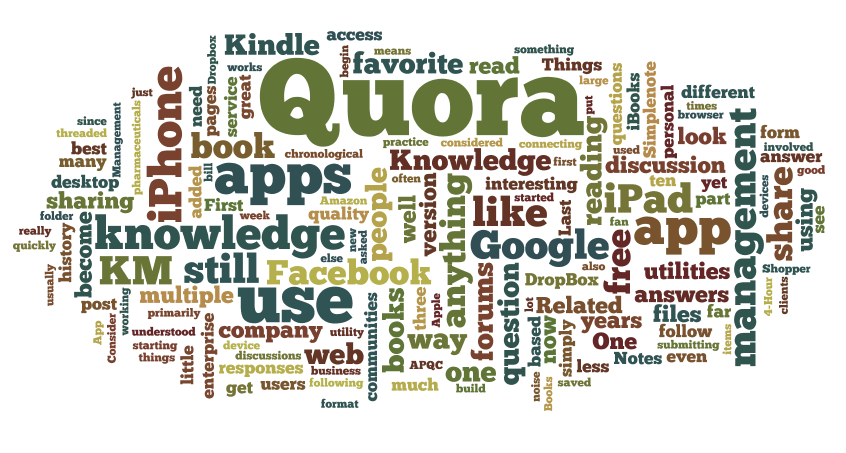
A word cloud generated from my RSS feed

Earlier today I participated in the weekly KMers.org tweet chat. This week’s discussion was hosted by Kate Bower, discussing the role of self management and self regulation in personal knowledge management (PKM). There was some dissent as to whether PKM required a certain level of obsessive compulsive disorder — OCD — or whether there it was possible to use more of a mad scientist approach to PKM.

To answer the question, you must first define personal knowledge management. What exactly is PKM?

Wikipedia defines PKM as: “a collection of processes that an individual carries out to gather, classify, store, search, retrieve, and share knowledge in his/her daily activities and how these processes support work activities.”

In my view, there are three dimensions to personal knowledge management.

First, you need an awareness of your knowledge. You have to know what it is that you know. This is challenging for many people, whether out of modesty or a lack of self-awareness, but technology is helping. Tools like desktop search and word clouds can help surface the subjects that we have a keen interest in — our likely areas of expertise and knowledge.

Next, you need to be open to learning. Equally important to knowing what you know is knowing what you don’t know, and being open to learning and growing. None of us have a monopoly on knowledge. Some might argue that PKM devalues the need for knowledge sharing with others, but the opposite is closer to the truth. As we understand what we know — and do not know — we see where we can contribute to the larger group. At the same time, we see how we can leverage the knowledge and expertise of others in that group where we have gaps in our own knowledge.

Finally, you must be open to sharing. Unless your tacit knowledge is applied, is it really knowledge at all? What is the value of knowledge that goes unused and unshared?  And the beauty of knowledge sharing is that there is an infinite supply. If I give my knowledge to you, I still retain possession. It’s simply multiplied.

As personal knowledge is shared, the entire organization grows and benefits.

During the course of our chat, several members (myself included) described their approach to PKM as that of an mad scientist. I’m not particularly rigorous about folders, hierarchy and information organization. I’d much prefer to leverage technology to help percolate my knowledge to the top.

There are two excellent tools that can help with this.

First, personal search. Simply being able to search my hard drives for the information is often much faster than navigation down a series of folders, especially since search can look beyond file names into the actual content. Search is built into both my Windows 7 PC and my Mac. For email, I use Gmail, which provides super-fast searches through my entire email archive. There are also third-party search tools that will index your hard drive, but I’m quite content with the simplicity of the built-in search.

A word cloud generated from my Delicious bookmarks

Second, word clouds. Wordle.net will take your blog or your Delicious bookmarks and automatically create a word cloud based on the topics that appear most frequently. Word clouds are a great way to visualize the relative importance of topics, as the size of each word is determined by the number of times it appears.

These tools are simply aids that will help you divine your interests (and theoretically areas where you might have some budding expertise). The next steps — growing and sharing — are up to you.

What does PKM mean to you, and what tools and techniques have you found useful?

Posted on — 1 Comment

January Reading List

Reading

One of the wonderful things about an iPad is that you can take your virtual library with you where ever you go. Spare moments become opportunities to catch up on reading. I’ve got three different e-readers: the Apple iBooks app, the Amazon Kindle App and the Google Books app.

iBooks is great for storing and reading PDFs, and I’ve ended up with a collection of user guides and work-related papers there. Google Books is interesting, and free, but I have yet to purchase anything or even seriously read anything with it. So far the Amazon Kindle app has been my favorite. The price of Kindle books tends to be a little cheaper than iBooks for some reason, and the reader works great.

Recent Reads

Over the holidays I managed to burn through three books (all consumed via the Kindle app):

UnMarketing: Stop Marketing, Start Engaging by Scott Stratton is a great read on how to leverage social media as a way to engage and build relationships with your customers. Instead of shouting to them from a soapbox, engage them in a conversation.

Keith Ferrazzi’s Never Eat Alone: And Other Secrets to Success, One Relationship at a Time is a few years old, but the stories and experiences he shares still piqued my interest. Ferrazi came from humble beginnings and went on to do quite well. He chalks it up to the power of connecting to people. Not using them, but building genuine relationships that are mutually beneficial.

The 4-Hour Body was written by Timothy Ferriss, author of the New York Times bestseller The 4-Hour Workweek. It’s designed to be read in sections, picking in choosing based on your own goals and objectives. His views are provocative — he’s a big fan of pharmaceuticals — and I’m still chewing over his ideas.

One of the observations after reading these books on my iPad is that while it’s wonderful to have  a selection of books with me at all times, the experience of working through a book is less satisfying. I mentioned this to my girlfriend (a Kindle fan) and she agreed. You don’t get the tactile satisfaction and immediate appreciation for where you are in the book. Yes, I know that there are visual cues like the little slider at the bottom of the screen, but it doesn’t replicate that feeling you get as the pages ahead become fewer and lighter.

My January Reading List

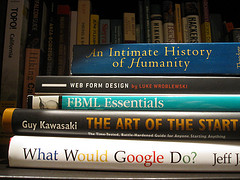
So this month, I’m going old school and reading physical books. Fortunately, Santa was good to me this Christmas, and my bookshelf is full. Here’s what’s up this month:

An Intimate History of Humanity by Theodore Zeldin. Published in 1994, this book looks at history from a humanistic perspective. Rather than look at history as a series of chronological events, Zeldin looks to history to discover “How some people have acquired an immunity to loneliness,” and “How respect has become more desirable that power.” Interesting premise.

Web Form Design – Filling in the Blanks by Luke Wroblewski is considered by many to be the definitive resource for usability of the all-important point of interaction between human and machine: the web form. Consider that I am using a web form to compose and submit this blog post. You may (hopefully) use the web form below to share a comment. We use web forms for email, discussion forums, chat rooms, documents, banking and shopping. They are — for now — the primary method of interaction on the web. And yet, so few websites do them well. I’m hoping to do my part to change that.

FBML Essentials by Jesse Stay is less of a read and more of a reference guide to FBML — the Facebook Markup Language. You may hear more about Facebook from me in the not-too-distant future.

Guy Kawasaki is a former Apple Fellow and noted entrepreneur and venture capitalist. His book The Art of the Start is a guide for anyone starting anything — whether that be a new product, service, company or club. Since I’m always starting up something, I figured it wouldn’t hurt to learn from a master.

What Would Google Do? is Jeff Jarvis’ treatise on how to do business in the Age of Google. The first few sentences from the book offer a telling glimpse at the premise: “It seems as if no company, executive, or institution truly understands how to survive and prosper in the internet age. Except Google. So, faced with most any challenge today, it makes sense to ask: WWGD? What would Google do?”

My book report will follow. First I have some reading to do!

Posted on — 2 Comments

iPhone App Picks: Four Essential Utilities

I was giving Rutger Hensel some grief over just discovering the excellent (and free) Waze app for turn-by-turn driving directions. It provides a lot of the functionality of TomTom, but it’s $99 less! He asked me what other apps I recommended, and I promised to share it here.

Unfortunately, I have way too many apps to cover in a single post, so I’m going to post a series covering my favorite apps, breaking it down based on how I organize my apps and beginning with utilities.

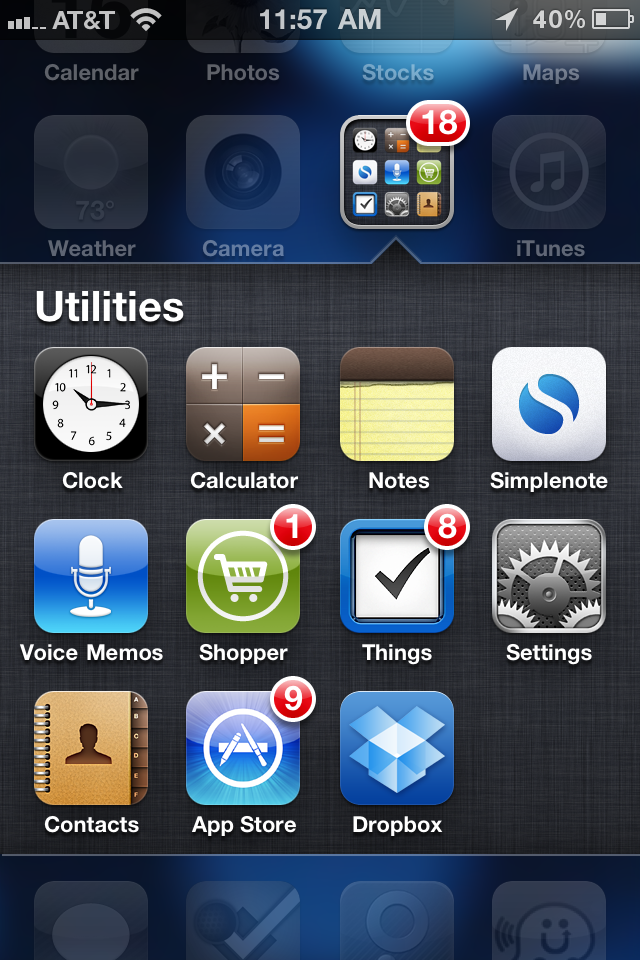
As you can see, I like to keep things organized in folders. I still have multiple pages of apps — nine at last count — but I want the apps that I use regularly on the first three pages. This means that folders are a necessity.

First up on page one is my Utilities folder. Most of the apps here are standard iPhone apps like the Clock (which I use as my alarm clock and a timer when cooking), the Calculator, Notes, Voice Memos, the App Store and Contacts. I put Settings in here as well, only because I don’t use it every day.

To this group I’ve added the following four indispensable iPhone utilities:

Simplenote

Simplenote is a terrific little free utility that is part Notes, part DropBox. You create an account and then you can use Simplenote from your iPhone, iPod Touch, iPad or computer. It’s essentially like the regular Notes app, with one significant difference — your notes are saved in The Cloud. This means that you can create, access and edit your notes from whatever Internet-connected device happens to be handy. I use this for lists and note-taking on my iPhone or iPad, then access them later from my desktop. On my desktop, I just use my browser, but there are a number of desktop clients for both Macs and PCs available.

Shopper

I started using Shopper to build my grocery list, but have since used it for trips to the home improvement store and pretty much anything else I would shop for. I like that I can simply and quickly add items to any of my multiple lists right when the idea strikes. As I go through the aisles at the market, I check off the items that I put in my basket.  Note that there is a free version and a commercial version. I’ve only used the free one, and it fits the bill better than anything else I’ve run across.

Things

One of the basic functions notably missing from the iPhone is task management. Things is a commercial app, and at $9.99 for the iPhone, it ain’t cheap. But it is elegant, intuitive, and works exactly like I need. It was worth the $9.99. There is also a $19.99 version optimized for the iPad, and I’ve since graduated to that. What I haven’t done (yet) is spring for the $49 Mac app, which would sync everything. For now, the iPad version fits the bill for me, but if you only have an iPhone, Things still rocks.

Dropbox

Last but not least is one my favorite utilities. I started using DropBox as brainlessly simple way to share files between PCs. Since then, I’ve added the DropBox app to my iPhone and iPad. How does it work? Essentially it creates a special folder on your device where the files you want to share are stored. I use it primarily for personal sharing between my own devices — multiple computers and OS, and multiple mobile devices. But I’ve also had occasion to use it with clients to share larger files like videos and images. You choose what you share and what you keep to yourself.

Dropbox has saved my butt many times, giving me easy access to all my essential working files whenever and wherever I need them. And it’s free, although you can pay for additional storage.

Of course there are other apps I use that might be considered utilities, but these are my personal favorites. Next week, I’ll look at my favorite photography apps.

Do you have a favorite utility that I’ve overlooked? Share in the comments below.

Posted on — 1 Comment

What is Quora, and Why Should I Care?

If you haven’t heard of Quora, you should. It’s been getting a lot of buzz. What is Quora? According to their website, “Quora is a continually improving collection of questions and answers created, edited, and organized by everyone who uses it. Quora was founded in April 2009 by Adam D’Angelo, who was previously CTO and VP of engineering at Facebook, and Charlie Cheever, who led Facebook Connect and Facebook Platform. Quora is privately held and funded by Benchmark Capital, and is based in Palo Alto, CA.”

Having been involved in discussion forums, developing online communities such as BigBlueBall as well as enterprise communities in the context of knowledge management (KM), what’s interesting to me is how Quora takes the traditional threaded discussion format and completely reinvents it, with some excellent results.

Granted, there are important differences between Quora and a discussion forum. Quora is specifically and exclusively suited to a question and answer format. Forums can serve a much broader purpose, including open discussions, brainstorming and ad hoc, asynchronous collaboration. But when you look at most forums, a large percentage of the discussions begin with someone who needs help (they have a question) and subsequent responses (answers, in the best case scenario).

How does Quora do this differently? First of all, forums typically require the participants to begin by navigating to the category that is best suited to their topic. This alone can quickly become a barrier, as the way I would categorize something might be very different than the way other people would. In Quora, you simply ask a question. You have the option of tagging a question with one or more keywords (roughly analogous to categories). Other Quora users can follow (think subscribe) specific questions if they are curious about the answer, or they can follow a tag and get notified of any activity tagged with that keyword.

Second, where forum are typically listed in either a threaded view (i.e. Slashdot) or chronological view, Quora allows the responses to be resorted. Other Quora users can vote on the best answers, and they percolate to the top.

The Q&A type site isn’t really anything new. Google tried it before, and failed. Yahoo! Answers is another service that has hung in there, but the quality is spotty. So far, the quality of the responses has really set Quora apart. It’s not uncommon to see a CEO or founder of a company jump in with a response to a question about their business model. The particpants, by and large, are a higher caliber than I’ve seen in similar systems.

What happens next? Last week at the Social Media MasterMinds meetup in Orange County, we speculated that the opportunity for Quora has already come and gone. The theory is that once it goes mainstream, the quality suffers. The noise level increases as people look for ways to “use” Quora to improve their SEO, market their company or service, or insert spam links for pharmaceuticals.

I’m still in discovery mode on Quora. I’m following a few topics — some personal (hiking) and some professional (knowledge management). I’ve voted up a few good answers, added an answer, and asked a couple questions (with mixed results so far). The process has been interesting and even useful, but the jury is still out on whether I’ll stick with it. For now, you can me find here on Quora.

If you work with forums, online communities or KM, Quora is worth looking at. Consider it food for thought.

Posted on — 3 Comments

The Future of Knowledge Management

The knowledge extraction helmet

I’ve been directly involved in knowledge management — the science of collecting, sharing and leveraging knowledge — for nearly ten years, and indirectly much longer. Knowledge management, or more simply KM, is often unknown outside of the organizations who practice it. Sometimes KM is disguised with a different moniker — knowledge sharing, collaboration, team rooms, Enterprise 2.0 and so on. And among those who do practice KM, there is often a misperception that KM is a tool — a software solution.

The reality is that even after ten years of revolutionary KM, it’s still primarily about connecting people. Cutting through the digital noise and making a connection with that person whose expertise intersects with my need.

Now for the next ten years. How do you see knowledge sharing changing between now and the year 2020?