Posted on 1 Comment

Robert Scoble, Loic Le Meur and… Jeff Hester?

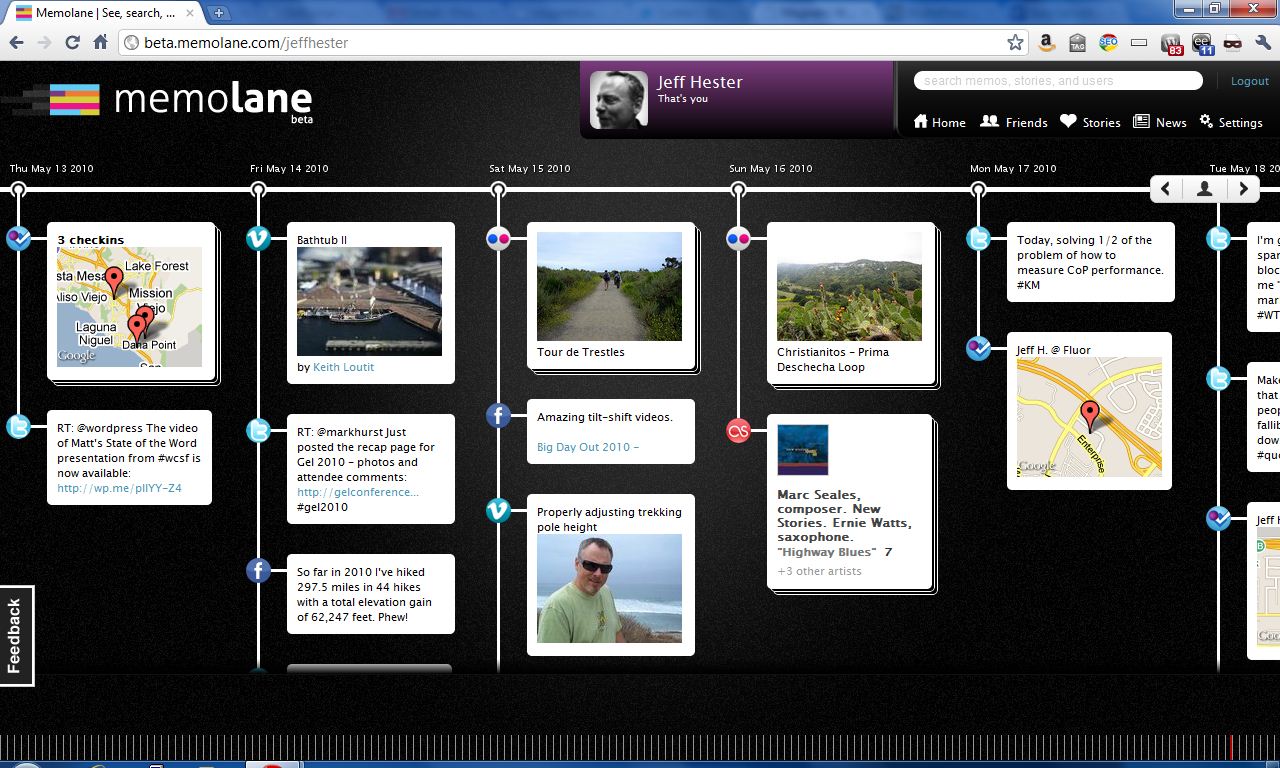
I introduced you to Memolane last week, and today they have opened their beta to everyone — no invite codes required (and perfectly timed to capitalize on that SXSW buzz). For me the real shock came when I looked at their homepage. Newly added is the “Featured Memolanes” section, including Robert Scoble, Loic Le Meur, and… Jeff Hester? Apparently living online has paid off. Set your timer to 15 minutes and press “Start.”

In addition to opening Memolane up (strategically timed to take advantage of SXSW), they’ve also added integration with Instagram (yay) and MySpace (yawn).

As I’ve been playing with Memolane, I’m enjoying the interface. It’s a fantastic way to peruse your digital history. You can check out my Memolane — and feel free to sign-up and add me.

Still not convinced? Check out this video introduction to Memolane.

Posted on 4 Comments

What is Memolane?

It’s been said that everything you do or say on the Internet is there for ever. But even with all the various websites and services we use, it’s still not easy to collect all those tweets, posts, photos and other artifacts in a organized way. Flavors.me does a fair job of aggregating this data, and Facebook is doing more and more aggregation. But neither of these attempt to take a historical look back at your activity. This is where Memolane attempts to fill the gap, creating a digital timeline of your contributions.

Currently in beta, Memolane allows users to configure a variety of popular services and then automatically collects them in a timeline. The services supported include Facebook, Twitter, Flickr, Last.fm, Picasa, RSS feeds, YouTube, Vimeo, Foursquare and TripIt, with support for additional services promised.

The results are pretty amazing. You can scroll back through time and see where you checked in, what you tweeted, what photos you posted and so on. Across the bottom of the screen is a series of vertical lines that represent a granular view of time that lets you quickly scroll through years of data. Slick!

You have control over whether you share this publicly or not, but I noticed some glitches. For instance, if you have photos marked private on Flickr, they still come over into your Memolane timeline. Depending on your Memonlane settings, they may be visible in your “lane” regardless of your Flickr settings. Not great, but then it’s still in beta.

If you’re interested, you can check out my Memolane here.

UPDATE: Beta Invites

Memolane Community Manager Meghan Krane graciously gave me an invite code to share with you (thanks, Meghan!). If you’d like to try Memolane for yourself, sign-up here using the invite code “hester”.


Posted on 1 Comment

Piping Hot Blackbird Pie

“Sing a song of sixpence,
A pocket full of rye.
Four and twenty blackbirds,
Baked in a pie…”
Sing a Song of Sixpence, popular nursery rhyme*

Growing up, we all sang the familiar song. Thankfully, I’ve never tasted blackbird pie (nor do I desire to). I never even really thought much about what I was singing as a child, otherwise I might have gagged.

Fortunately, there’s a new kind of Blackbird Pie that’s actually quite tasty. I’m referring of course to the fantastic Blackbird Pie plugin for WordPress.

The Blackbird Pie plugin let’s you easily quote a tweet with the links and look of the original tweet, like this:

[blackbirdpie url=”http://twitter.com/#!/jeffhester/status/39511689892339712″]

Blackbird Pie adds an icon to the TinyMCE visual editor. When you are editing your post, click the Blackbird button and you’ll see a screen that let’s you paste in the URL to the tweet you want to share, or search for a tweet.

My original tweet. The URL is highlighted and copied to the clipboard.

Here’s the dialog for inserting a tweet:

The sweet thing about Blackbird Pie is that all the links that would be “live” in the original tweet are live in your post as well, including linked Twitter handles, the client used and any links.

The Twitter API is called only the first time. The generated HTML is stored in a hidden custom field so subsequent loads won’t rely on Twitter uptime.

If you ever have occasion to post a tweet on your WordPress-powered website, Blackbird Pie is a must-have plugin. And it’s also supported on WordPress.com, too!

*Incidentally, some say the 24 blackbirds baked in a pie refers to an actual historical event. Who knew?!

Posted on Leave a comment

Three Options for Custom Fonts on Your Website

A sample of the League Gothic web font

One of the challenges of designing for the web is that the font you want for your design may not be available on the computers your audience use. Resolving this usually requires either 1) Ditching the design intent and sticking with broadly supported font families; 2) Creating images containing text, in which case you can use whatever font you have; or 3) Using a web font type kit.

Option #1 is unappealing to most designers, although it shouldn’t be dismissed out of hand. There’s a good reason that those fonts are widely used. They’ve stood the test of time. Ever see the documentary Helvetica? Watch it.

Option #2 is not so great, though I’ve seen it done and it can work successfully if kept to a minimum. Images are always heavier than text alone, and much more difficult to update. Search engines can’t read them well, so you need to include ALT text.

Option #3 requires a little more effort, but the results are much more flexible. There are several web font kits available.

TypeKit was one of the original. They are a commercial service with access to a large library of quality, licensed fonts. You can get a free account for a single website, which is what I did recently for U.S. Speed Sport. You can see the page title (“Drag Racing” in this case) uses a special font provided by TypeKit. The drawback with the free account is that you have a limited library of fonts, and you’re required to display the TypeKit badge. It’s not obtrusive and might work for a smaller site, but bigger sites will probably want to pay for the non-badged license.

Google Web Fonts is a free alternative that is based on the TypeKit code. The javascript kits are very similar. The advantage here is that there is no badging requirement, but the library is even more limited than TypeKit’s free level.

My most recent discovery is a site called Font Squirrel. They literally hundreds of web fonts available in prebuilt kits, and you can create your own. I haven’t had a chance to use Font Squirrel yet, but it looks promising.

Are you using web fonts in your designs?

Posted on Leave a comment

Meet Me at WordCamp San Francisco

This year WordCamp San Francisco celebrates it’s fifth anniversary. I attended the first WordCamp SF way back in 2007. It was a much more intimate affair back then, and the sense of community was unmistakable.

Five years later, the event has grown to three days, and a much bigger venue than that humble beginning. The dates for WordCamp SF and venue have been confirmed: August 12-14 at the Mission Bay Conference Center. According to Jane Wells, the tentative plan is to focus programming for publishers on Friday, bloggers on Saturday, and developers on Sunday.

Who should go to WordCamp SF?

If you work with WordPress, whether for your own sites or clients, WordCamp provides a unique opportunity for intensive learning and community building. You’ll rub elbows with others who love and use WordPress, everyone from designers and developers to small-time bloggers and big corporate names (yes, they use WordPress too!).

The first ever WordCamp SF back in 2007

WordCamp SF is the biggest and original WordCamp, and is where Automattic’s Matt Mullenweg delivers his annual State of the Word address. WordCamp SF is different from the many excellent local WordCamps. While the local events generally focus more exclusively on WordPress, the San Francisco event pulls in some big name speakers talking about bigger topics.

I highly recommend attending a local WordCamp for the intensive learning and networking opportunity with local WordPress folks. For me, I attend WordCamp OC (I helped Brandon Dove and Jeffrey Zinn of Pixel Jar organize last year) and WordCamp LA. This year, I’ll probably be found at WordCamp San Diego, too.

Another great local option? Check out Meetup.com for local WordPress user groups. We are fortunate here in Orange County to have a very active group organized by Jeff Turner and Steve Zehngut of Zeek Interactive.

If you can swing the trip to San Francisco, also attend WordCamp SF for the inside scoop and the inspiration. It’s a big event, and like any big conference, it helps to network with other attendees before you go to make the most of the trip.

You can find a complete list of local WordCamp events at WordCamp Central. For instance, this very weekend there’s WordCamp Phoenix (Hey guys, look forward to hearing all about it!).

Mark your calendars for WordCamp SF, and be sure to let me know if you are planning on attending. We’ll meet up for a cold beverage!

Posted on 1 Comment

What is Quora, and Why Should I Care?

If you haven’t heard of Quora, you should. It’s been getting a lot of buzz. What is Quora? According to their website, “Quora is a continually improving collection of questions and answers created, edited, and organized by everyone who uses it. Quora was founded in April 2009 by Adam D’Angelo, who was previously CTO and VP of engineering at Facebook, and Charlie Cheever, who led Facebook Connect and Facebook Platform. Quora is privately held and funded by Benchmark Capital, and is based in Palo Alto, CA.”

Having been involved in discussion forums, developing online communities such as BigBlueBall as well as enterprise communities in the context of knowledge management (KM), what’s interesting to me is how Quora takes the traditional threaded discussion format and completely reinvents it, with some excellent results.

Granted, there are important differences between Quora and a discussion forum. Quora is specifically and exclusively suited to a question and answer format. Forums can serve a much broader purpose, including open discussions, brainstorming and ad hoc, asynchronous collaboration. But when you look at most forums, a large percentage of the discussions begin with someone who needs help (they have a question) and subsequent responses (answers, in the best case scenario).

How does Quora do this differently? First of all, forums typically require the participants to begin by navigating to the category that is best suited to their topic. This alone can quickly become a barrier, as the way I would categorize something might be very different than the way other people would. In Quora, you simply ask a question. You have the option of tagging a question with one or more keywords (roughly analogous to categories). Other Quora users can follow (think subscribe) specific questions if they are curious about the answer, or they can follow a tag and get notified of any activity tagged with that keyword.

Second, where forum are typically listed in either a threaded view (i.e. Slashdot) or chronological view, Quora allows the responses to be resorted. Other Quora users can vote on the best answers, and they percolate to the top.

The Q&A type site isn’t really anything new. Google tried it before, and failed. Yahoo! Answers is another service that has hung in there, but the quality is spotty. So far, the quality of the responses has really set Quora apart. It’s not uncommon to see a CEO or founder of a company jump in with a response to a question about their business model. The particpants, by and large, are a higher caliber than I’ve seen in similar systems.

What happens next? Last week at the Social Media MasterMinds meetup in Orange County, we speculated that the opportunity for Quora has already come and gone. The theory is that once it goes mainstream, the quality suffers. The noise level increases as people look for ways to “use” Quora to improve their SEO, market their company or service, or insert spam links for pharmaceuticals.

I’m still in discovery mode on Quora. I’m following a few topics — some personal (hiking) and some professional (knowledge management). I’ve voted up a few good answers, added an answer, and asked a couple questions (with mixed results so far). The process has been interesting and even useful, but the jury is still out on whether I’ll stick with it. For now, you can me find here on Quora.

If you work with forums, online communities or KM, Quora is worth looking at. Consider it food for thought.


Posted on 2 Comments

Expanding my Knowledge at WordCamp LA

My Saturday mornings are usually either 1) a day to sleep in after a late night Friday or 2) a day to get up early and hit the trailhead, climbing one of my favorite local mountains. Today, I broke that mold, getting up early to feed my brain at WordCamp LA.

My first WordCamp experience was at WordCamp San Francisco back in 2007. This past year, I worked with Brandon Dove and Jeffrey Zinn to help organize WordCamp OC. WordCamp is a great way to immerse yourself in the WordPress community and learn a lot in a short time from some really brilliant people.

Some people are put off by the thought of attending WordCamp, thinking it’s too advanced for them, but there really is something for everyone — developers, designers, bloggers and people just thinking about blogging — all of them have something to gain.

Chances are good there’s a WordCamp in your area. If you are using WordPress, or even considering using WordPress, check out the schedule of upcoming WordCamps and sign up! You’ll be glad you did.

Oh, and if we met at WordCamp LA, leave a comment or send me a tweet @jeffhester with the hashtag #wcla.