Posted on 4 Comments

The Origin of Follow Friday

Follow Friday is a popular Twitter meme that has been around since early 2009. What is Follow Friday and how did it get started? And what makes a great Follow Friday tweet?

Follow Friday is a way for Twitter users to recommend other Twitter users to their followers. In essence, when you mention someone in a Follow Friday tweet, you’re saying to all of your followers, “You follow me and like my tweets, so you’ll probably also like the tweets from these people, too.”

How Follow Friday Began

Follow Friday can be traced back to this tweet from Micah Baldwin (@Michah) on January 16, 2009.

[blackbirdpie url=”http://twitter.com/micah/status/1124262248″]

The concept was simple enough. Suggest a person to follow using the #followfriday hash tag, and your followers should follow them.  Since then, #followfriday has been abbreviated to simply #ff.

If you’ve been active on Twitter for any length of time, you’ve likely seen yourself mentioned in a Follow Friday tweet. This is generally a good thing, because it means someone thought you were worthy of recommending that all of their followers also follow you.

The problem with many Follow Friday tweets is that they include very little context. Ideally, when you see one of these tweets, you should have some idea about why this person is worth following. In some cases, the person doing the recommendation may have a great reputation for only suggesting really good people to follow, and you can simply trust their recommendation.

Other times, the context is self-evident, as in this Follow Friday tweet:

[blackbirdpie url=”https://twitter.com/hikinglady/status/38630817538383872″]

It’s pretty clear from the name of the tweeter (@hikinglady) as well as at least one of her follow recommendations (@theSoCalHiker) that these recommendations probably have something to do with hiking. If you’re into hiking (which you probably are if you’re following @hikinglady) then you may well be interested in following these other hikers, too.

What about when you don’t know the tweeter well, and the context of the recommendation is unclear? Should you simply follow their recommendations? What is the proper etiquette for responding to a Follow Friday tweet?

Follow Friday Tweet Etiquette

There are two parts to Follow Friday tweet etiquette: what you do when you receive follow recommendations, and how you make your own #FF recommendations.

First of all, never simply follow everyone who gets suggested unless you have a high level of confidence in the person making the recommendations. Barring that, if it seems like an obvious fit (i.e. the hiking example above), you can make a judgement call. Most of the time, I will take a few moments and actually click to view the user’s twitter profile and recent tweets. I want to make sure their tweets seem to fit the subject and content I would be interested in. And I also ignore any users with the telltale signs of a twitter spammer.

When making your own Follow Friday recommendations, the best way to do it is by adding a little context. At today’s Social Media Masterminds of Orange County  — better known simply as SMMOCKirsten Wright (@kirstenwright) suggested that rather then sending a long list of names, send a tweet with just one name and a little context explaining why they are worth following.

[blackbirdpie url=”http://twitter.com/kirstenwright/status/39008698798051328″]

Fellow SMMOC-er Mel Aclaro (@melaclaro) took this concept one step further and suggested that rather than just posting a list of twitter names, write a blog post introducing you to these people and why they are worth following. You can tweet the Follow Friday announcement with a link to your blog. A great suggestion, and one that I’ll be using in the near future.

Creating a Follow Friday Tweet, Step-by-Step

  1. Is it Friday? If not, don’t use the #ff hash tag. It’s bad form. Save your Follow Friday tweets for Fridays. If you want, you could use a tweet scheduling service like CoTweet or

Other Twitter Memes

Memes come and go, but Mashable posted a partial list of Twitter memes for every day of the week.

As you grow more comfortable with Twitter, begin using the Follow Friday techniques to share your favorite people and reap the karma you’ve sown.

Posted on 1 Comment

Piping Hot Blackbird Pie

“Sing a song of sixpence,
A pocket full of rye.
Four and twenty blackbirds,
Baked in a pie…”
Sing a Song of Sixpence, popular nursery rhyme*

Growing up, we all sang the familiar song. Thankfully, I’ve never tasted blackbird pie (nor do I desire to). I never even really thought much about what I was singing as a child, otherwise I might have gagged.

Fortunately, there’s a new kind of Blackbird Pie that’s actually quite tasty. I’m referring of course to the fantastic Blackbird Pie plugin for WordPress.

The Blackbird Pie plugin let’s you easily quote a tweet with the links and look of the original tweet, like this:

[blackbirdpie url=”http://twitter.com/#!/jeffhester/status/39511689892339712″]

Blackbird Pie adds an icon to the TinyMCE visual editor. When you are editing your post, click the Blackbird button and you’ll see a screen that let’s you paste in the URL to the tweet you want to share, or search for a tweet.

My original tweet. The URL is highlighted and copied to the clipboard.

Here’s the dialog for inserting a tweet:

The sweet thing about Blackbird Pie is that all the links that would be “live” in the original tweet are live in your post as well, including linked Twitter handles, the client used and any links.

The Twitter API is called only the first time. The generated HTML is stored in a hidden custom field so subsequent loads won’t rely on Twitter uptime.

If you ever have occasion to post a tweet on your WordPress-powered website, Blackbird Pie is a must-have plugin. And it’s also supported on WordPress.com, too!

*Incidentally, some say the 24 blackbirds baked in a pie refers to an actual historical event. Who knew?!

Posted on 9 Comments

Twitter Basics: Dealing with Spammers

As Twitter grows in popularity, it’s inevitable that some people will abuse the system. Plenty of people out there promote themselves or their company on Twitter. I’m fine with that, as long as it’s done well (Zappos is an example that comes to mind). But increasingly, unscrupulous “marketers” are using automated services and programs with the intent of building lists of followers in hopes of promoting a service or business (or sometimes, a wide range of businesses).

Here’s how to detect a Twitter spammer and what you can do to help stop them.

Watch your new followers carefully. I get email notifications of new followers. This morning in my inbox I had a number of new followers in quick succession.

That the first tip-off: a cluster of new followers in a very short period of time.

Opening one of the emails, I noticed something unusual. The email shows what tool they used to follow you — TweetDeck, Co-Tweet, etc. — but in this case, “Hazel G” followed me using angulate leafhopper. Hmmm… smells like B.S. to me. Sure enough, the link went to the website of a limo service in NYC.

Looking at the number of tweets (zero), I can tell right from this email that this isn’t a real person at all. No need to check their profile. Click the report Hazel G for spam link to notify Twitter that this non-person is actually controlled by a spammer.

You might not be configured to receive email notifications of new followers. Instead, you can view your followers and see who’s new. A quick look and it’s easy to see more clues that they are a spammer.

In this case, Hazel’s bio offers further clues. First of all, she doesn’t look like the sort of woman who would call herself an “iPhoneSlut” nor does she look like she’s into hip-hop (no offense to middle-aged white women who love hip-hop).  Sometimes I wish the spammers would at least do a little more work creating their fictitious identities. The current results are hilarious. And it gets better. Consider “Ernest”:

Ernest must curse the day her parents have her a guy’s name. Maybe that’s what drove her to become a punk rock, high fashion hippie.

I thought that was strange combination of interests, but apparently it’s much more common than I thought!

What kismet! Elizabeth is also a punk rocking, high fashion hippie who is saving the world. Maybe they were separated at birth (by more than 20 years?).

At any rate, you get the point. It’s not hard to spot a spammer. So what how do you handle them? Report them to Twitter:

This will block them from following you (which could possibly mislead your real followers) and notifies Twitter of abuse. They get enough of these, and Elizabeth’s account gets suspended.

The Bottom Line

What’s the lesson here?

  1. Don’t auto-follow people who follow you. Although it takes more curation to vett followers manually, the net result is higher quality communication and less noise. Your goal with Twitter should never be to collect the most followers, but to build relationships with people who matter to you.
  2. Report the spammers. If we all do this regularly and consistently, it will improve the Twitterverse for everyone. It only takes a click!

I’ve seen a number of people recently using TrueTwit. This sends new followers a direct message asking them to verify that they are a human via a CAPTCHA. Personally, I find this a nuisance, but I understand why some people resort to such a service.

What tools and techniques do you use to stop Twitter spam?

Posted on 12 Comments

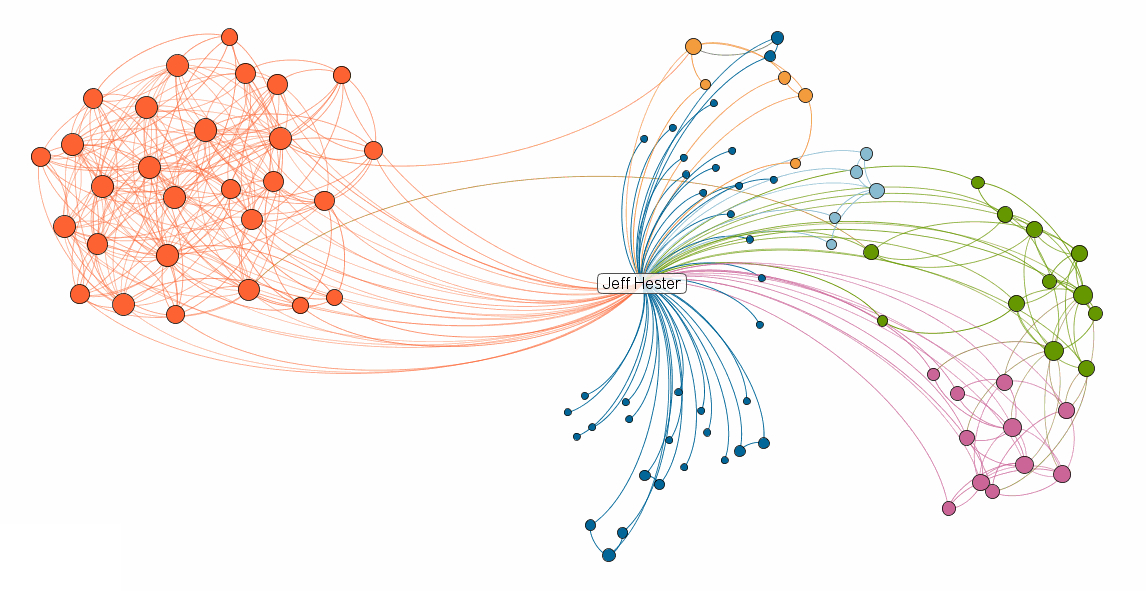
Visualize Your Professional Network with InMaps

LinkedIn Labs has introduced InMaps – a visualization of your LinkedIn network. I first heard about InMaps via a Tweet from fellow #SMMOCer Mel Aclaro. LinkedIn wisely made sharing easy, and so a quick search will find plenty of fresh tweets about this as people discover the new feature.

I gave InMaps a quick spin and quickly discovered LinkedIn’s not-so-subtle ulterior motive: You can’t create a visualization unless you have at least 50 connections and your profile is at least 75% complete.

I’ll bet you a cold beverage that LinkedIn enjoys an sudden surge in both profile completion and network connections as a result.

For LinkedIn, it’s a brilliant move. By offering something sexy that people want (the groovy diagrams) but requiring them to step up and engage on a deeper level, the entire network wins. And (theoretically) they drive the behavior that they want from their community — people sharing deeper knowledge about their experience and connections.

How can we bring change to our community/organization/business/world? One small incentive at a time.

If you care, you can check out my visualization, create your own, or connect with me on LinkedIn.

Posted on 1 Comment

January Reading List

Reading

One of the wonderful things about an iPad is that you can take your virtual library with you where ever you go. Spare moments become opportunities to catch up on reading. I’ve got three different e-readers: the Apple iBooks app, the Amazon Kindle App and the Google Books app.

iBooks is great for storing and reading PDFs, and I’ve ended up with a collection of user guides and work-related papers there. Google Books is interesting, and free, but I have yet to purchase anything or even seriously read anything with it. So far the Amazon Kindle app has been my favorite. The price of Kindle books tends to be a little cheaper than iBooks for some reason, and the reader works great.

Recent Reads

Over the holidays I managed to burn through three books (all consumed via the Kindle app):

UnMarketing: Stop Marketing, Start Engaging by Scott Stratton is a great read on how to leverage social media as a way to engage and build relationships with your customers. Instead of shouting to them from a soapbox, engage them in a conversation.

Keith Ferrazzi’s Never Eat Alone: And Other Secrets to Success, One Relationship at a Time is a few years old, but the stories and experiences he shares still piqued my interest. Ferrazi came from humble beginnings and went on to do quite well. He chalks it up to the power of connecting to people. Not using them, but building genuine relationships that are mutually beneficial.

The 4-Hour Body was written by Timothy Ferriss, author of the New York Times bestseller The 4-Hour Workweek. It’s designed to be read in sections, picking in choosing based on your own goals and objectives. His views are provocative — he’s a big fan of pharmaceuticals — and I’m still chewing over his ideas.

One of the observations after reading these books on my iPad is that while it’s wonderful to have  a selection of books with me at all times, the experience of working through a book is less satisfying. I mentioned this to my girlfriend (a Kindle fan) and she agreed. You don’t get the tactile satisfaction and immediate appreciation for where you are in the book. Yes, I know that there are visual cues like the little slider at the bottom of the screen, but it doesn’t replicate that feeling you get as the pages ahead become fewer and lighter.

My January Reading List

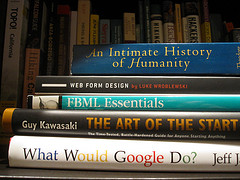
So this month, I’m going old school and reading physical books. Fortunately, Santa was good to me this Christmas, and my bookshelf is full. Here’s what’s up this month:

An Intimate History of Humanity by Theodore Zeldin. Published in 1994, this book looks at history from a humanistic perspective. Rather than look at history as a series of chronological events, Zeldin looks to history to discover “How some people have acquired an immunity to loneliness,” and “How respect has become more desirable that power.” Interesting premise.

Web Form Design – Filling in the Blanks by Luke Wroblewski is considered by many to be the definitive resource for usability of the all-important point of interaction between human and machine: the web form. Consider that I am using a web form to compose and submit this blog post. You may (hopefully) use the web form below to share a comment. We use web forms for email, discussion forums, chat rooms, documents, banking and shopping. They are — for now — the primary method of interaction on the web. And yet, so few websites do them well. I’m hoping to do my part to change that.

FBML Essentials by Jesse Stay is less of a read and more of a reference guide to FBML — the Facebook Markup Language. You may hear more about Facebook from me in the not-too-distant future.

Guy Kawasaki is a former Apple Fellow and noted entrepreneur and venture capitalist. His book The Art of the Start is a guide for anyone starting anything — whether that be a new product, service, company or club. Since I’m always starting up something, I figured it wouldn’t hurt to learn from a master.

What Would Google Do? is Jeff Jarvis’ treatise on how to do business in the Age of Google. The first few sentences from the book offer a telling glimpse at the premise: “It seems as if no company, executive, or institution truly understands how to survive and prosper in the internet age. Except Google. So, faced with most any challenge today, it makes sense to ask: WWGD? What would Google do?”

My book report will follow. First I have some reading to do!

Posted on 1 Comment

What is Quora, and Why Should I Care?

If you haven’t heard of Quora, you should. It’s been getting a lot of buzz. What is Quora? According to their website, “Quora is a continually improving collection of questions and answers created, edited, and organized by everyone who uses it. Quora was founded in April 2009 by Adam D’Angelo, who was previously CTO and VP of engineering at Facebook, and Charlie Cheever, who led Facebook Connect and Facebook Platform. Quora is privately held and funded by Benchmark Capital, and is based in Palo Alto, CA.”

Having been involved in discussion forums, developing online communities such as BigBlueBall as well as enterprise communities in the context of knowledge management (KM), what’s interesting to me is how Quora takes the traditional threaded discussion format and completely reinvents it, with some excellent results.

Granted, there are important differences between Quora and a discussion forum. Quora is specifically and exclusively suited to a question and answer format. Forums can serve a much broader purpose, including open discussions, brainstorming and ad hoc, asynchronous collaboration. But when you look at most forums, a large percentage of the discussions begin with someone who needs help (they have a question) and subsequent responses (answers, in the best case scenario).

How does Quora do this differently? First of all, forums typically require the participants to begin by navigating to the category that is best suited to their topic. This alone can quickly become a barrier, as the way I would categorize something might be very different than the way other people would. In Quora, you simply ask a question. You have the option of tagging a question with one or more keywords (roughly analogous to categories). Other Quora users can follow (think subscribe) specific questions if they are curious about the answer, or they can follow a tag and get notified of any activity tagged with that keyword.

Second, where forum are typically listed in either a threaded view (i.e. Slashdot) or chronological view, Quora allows the responses to be resorted. Other Quora users can vote on the best answers, and they percolate to the top.

The Q&A type site isn’t really anything new. Google tried it before, and failed. Yahoo! Answers is another service that has hung in there, but the quality is spotty. So far, the quality of the responses has really set Quora apart. It’s not uncommon to see a CEO or founder of a company jump in with a response to a question about their business model. The particpants, by and large, are a higher caliber than I’ve seen in similar systems.

What happens next? Last week at the Social Media MasterMinds meetup in Orange County, we speculated that the opportunity for Quora has already come and gone. The theory is that once it goes mainstream, the quality suffers. The noise level increases as people look for ways to “use” Quora to improve their SEO, market their company or service, or insert spam links for pharmaceuticals.

I’m still in discovery mode on Quora. I’m following a few topics — some personal (hiking) and some professional (knowledge management). I’ve voted up a few good answers, added an answer, and asked a couple questions (with mixed results so far). The process has been interesting and even useful, but the jury is still out on whether I’ll stick with it. For now, you can me find here on Quora.

If you work with forums, online communities or KM, Quora is worth looking at. Consider it food for thought.