Posted on 3 Comments

Is Social Media Turning us into Pathetic Losers?

This week I ran across two videos that you should watch. They paint a rather bleak view of technology and how it’s not really helping us become more connected. Not that this is the fault of technology. We are (I’m painting with broad strokes here) misusing technology.

The first is titled The Innovation of Loneliness. Based on Sherry Turkle’s book Alone Together (affiliate link), this video suggests that we are using social media to collect connections, rather engage in deeper, meaningful communication. We are curating our personal brand rather than interacting with transparency, openness and vulnerability.

The second video is titled I Forgot My Phone. It focuses on our fixation with these little devices that have invaded our every waking moment. What’s telling is the title itself. Is Charlene making a personal choice to not use her phone, or did she–as the title suggests–simply forget her phone?

In his book You Are Not a Gadget (affiliate link), Jaron Lanier explains how we restructure our lives and the way we do things to conform to the limitations of technology. We become slaves to the tools, rather than the masters we are meant to be.

Where are you on the social spectrum? Are social tools and technologies helping you build deeper, more meaningful connections? Or do these short videos ring true?

Posted on 5 Comments

Social Media Explained (with Donuts)

Social media takes on many forms, and is ever-evolving. This infographic explains the common perceptions behind some of the popular social media applications, illustrated with a use case that we can all relate to: donuts.

Social media explained with donuts

[jpshare]

You can quibble over the inclusion or exclusion of particular social media applications, but the intent remains much the same.

What exactly does this tasty infographic imply? Each social media application serves a unique purpose.

Twitter allows people to share brief updates and popularized the concept of #hashtags that has spread to Instagram and is now spreading to Facebook and Flickr. Of course, the real value for me is to connect with people around a subject (usually based on a hashtag), collecting and sharing ideas. Personally, this has been extremely useful to me in keeping up with the latest on #KM (knowledge management) and #hiking (my weekend passion).

#Hashtag Trivia: Chris Messina was the first to suggest the use of the hashtag in Twitter, back on August 23, 2007.

Facebook makes it really easy for people to share what they like, and in the process, collects valuable demographic information about you that they can sell to marketers. Mark Zuckerberg has promoted the concept of frictionless sharing, making it even easier for them to know what makes you tick. The benefits to you? The social graph search. This also benefits marketers. With over one billion users, is Facebook too big to fail?

Location-awareness application Foursquare gives you the opportunity to check-in at restaurants, stores, and businesses. The initial idea was that your friends in the area might see that you’re at a certain bar, and that would prompt them to join you. That never really took off (at least for me… my friends are apparently privacy-shy Luddites) but it has evolved in to a useful app for finding tips, recommending places near you, and even occasionally offering discounts and special offers for checking in. Facebook and Google have both been trying to get in on location-awareness for local marketing, but no clear winner has emerged.

Instagram isn’t the only smartphone photo-sharing application out there, but it’s one of the most popular. Instagram’s major innovation wasn’t the groovy, retro-photo filters that people either love or hate, but that it launched as a mobile-only social network. When they launched, you could only view or interact via your mobile phone. That’s since changed, but they recognized that a significant shift had occurred — we use mobile devices to connect to the Internet more than traditional computers.

YouTube has given everyone a chance to become a video star, and established itself as a black hole that bends time like nothing else. I’ve only dabbled with YouTube publishing, but some people have embraced the social network capabilities, using them to connect with others in new ways. And almost everyone I know ends up viewing a few videos on YouTube at some point during their week. For higher quality content (but lower views) check out Vimeo.

While most of the social media tools listed are primarily for personal use (and yes, I know there are businesses using all of them), LinkedIn is squarely focused on professional networking. Connecting with colleagues and clients takes precedence over grumpy cat photos and selfies. Although some people find LinkedIn boring, the focus on business is what sets it apart.

Pinterest approached the idea of sharing content from a fresh angle, letting people “pin” their favorite things to a board. With a focus on great images, it really took off, especially with women. Dozens of copycats have tried to replicate their success, but none have come close.

Many people haven’t heard of Last.fm, but this venerable social network has been capturing music listening habits for many years. Last.fm lets you autoscrobble the songs you play and–over time–knows what artists, genres and songs you like the most. Based on that, it can recommend new artists that it thinks you’ll enjoy, and can connect you with other people who share your taste in music. I’ve setup Last.fm to scrobble my plays on iTunes and Spotify, and occasionally listen to the Last.fm app on my Xbox, streaming music through my home theater system.

The punchline in the infographic is Google+. Of course, many, many more people use Google+ than just the folks employed there, but from the people I know, they are the early adopters. Google likes to tout high adoption numbers, but their figures are murky; clouded by the inclusion of users of other Google apps like Gmail. How many people really use Google+? We may never know. But they have a lot of potential users.

The Business Case for Social Media

Most people look at these social networks as primarily targeted at consumers, using them for the personal benefit. But that doesn’t mean the companies don’t have a business focus. And while all of these products are free for you to use (although some offer premium versions), you should remember this advice:

If you are not paying for it, you’re not the customer; you’re the product being sold. – blue_beetle

Advertisers and marketers love the rich demographic data available as a result of our living out loud through social media. This helps them deliver highly targeted advertising that you are (theoretically) more inclined to find useful. And it gives advertisers the tools to hyper-refine the targeting of their messages. Instead of merely targeting camera enthusiasts they can target female Canon DSLR enthusiasts in the Los Angeles area. Hyper-targeting.

And though they were the punchline of my infographic,  Google stands to gain handsomely from all of this data. They reign supreme as King of Search. And as their other suite of applications grows, they gain further opportunities to aggregate, correlate, and repackage you to advertisers.

So WIIFM?

What’s in it for me? Why do I use these various social networks? I use them to make new connections, and strengthen existing ones. I also use them for my personal data collection, as I grapple with the concepts behind the quantified self and how to apply that data for positive change.

What about you? What do you get out of social media? What do you love (or hate) about these tools?

Posted on 21 Comments

The Correct Way to Hang the Toilet Paper

Having recently moved into a new house, expanding the size (and improving the quality) of the household by 100%, this is but one of the many essential decisions that we made. Yes, it’s the quintessential question — what is the correct way to hang a roll of toilet paper. 

Infographic source: CurrentConfig, who also has a PDF version suitable for printing, folding and hanging on a toilet roll (should you know of someone who needs illumination on the proper technique).

Posted on 9 Comments

Twitter Basics: Dealing with Spammers

As Twitter grows in popularity, it’s inevitable that some people will abuse the system. Plenty of people out there promote themselves or their company on Twitter. I’m fine with that, as long as it’s done well (Zappos is an example that comes to mind). But increasingly, unscrupulous “marketers” are using automated services and programs with the intent of building lists of followers in hopes of promoting a service or business (or sometimes, a wide range of businesses).

Here’s how to detect a Twitter spammer and what you can do to help stop them.

Watch your new followers carefully. I get email notifications of new followers. This morning in my inbox I had a number of new followers in quick succession.

That the first tip-off: a cluster of new followers in a very short period of time.

Opening one of the emails, I noticed something unusual. The email shows what tool they used to follow you — TweetDeck, Co-Tweet, etc. — but in this case, “Hazel G” followed me using angulate leafhopper. Hmmm… smells like B.S. to me. Sure enough, the link went to the website of a limo service in NYC.

Looking at the number of tweets (zero), I can tell right from this email that this isn’t a real person at all. No need to check their profile. Click the report Hazel G for spam link to notify Twitter that this non-person is actually controlled by a spammer.

You might not be configured to receive email notifications of new followers. Instead, you can view your followers and see who’s new. A quick look and it’s easy to see more clues that they are a spammer.

In this case, Hazel’s bio offers further clues. First of all, she doesn’t look like the sort of woman who would call herself an “iPhoneSlut” nor does she look like she’s into hip-hop (no offense to middle-aged white women who love hip-hop).  Sometimes I wish the spammers would at least do a little more work creating their fictitious identities. The current results are hilarious. And it gets better. Consider “Ernest”:

Ernest must curse the day her parents have her a guy’s name. Maybe that’s what drove her to become a punk rock, high fashion hippie.

I thought that was strange combination of interests, but apparently it’s much more common than I thought!

What kismet! Elizabeth is also a punk rocking, high fashion hippie who is saving the world. Maybe they were separated at birth (by more than 20 years?).

At any rate, you get the point. It’s not hard to spot a spammer. So what how do you handle them? Report them to Twitter:

This will block them from following you (which could possibly mislead your real followers) and notifies Twitter of abuse. They get enough of these, and Elizabeth’s account gets suspended.

The Bottom Line

What’s the lesson here?

  1. Don’t auto-follow people who follow you. Although it takes more curation to vett followers manually, the net result is higher quality communication and less noise. Your goal with Twitter should never be to collect the most followers, but to build relationships with people who matter to you.
  2. Report the spammers. If we all do this regularly and consistently, it will improve the Twitterverse for everyone. It only takes a click!

I’ve seen a number of people recently using TrueTwit. This sends new followers a direct message asking them to verify that they are a human via a CAPTCHA. Personally, I find this a nuisance, but I understand why some people resort to such a service.

What tools and techniques do you use to stop Twitter spam?

Posted on 2 Comments

My 50-Word Bio

I’m submitting an abstract to speak at the APQC knowledge management conference in May 2011. As part of the submittal process, I had to write a 50-word bio.

Here’s what I came up with:

Jeff Hester is passionate about communities, working with leaders, employees and developers to help them deliver business value through KM. Co-author of three books and frequent speaker, the combination of engineering background and dot-com experience give him a unique ability to bridge the gap between practice and theory in plain English.

Whatever you think about my bio, I had a few observations about the process that anyone can benefit from.

  1. Telling someone who you are in 50 words or less is challenging. There’s a lot that goes unspoken in that bio.
  2. This bio was clearly  tailored to the audience (the knowledge management crowd). If I were speaking on WordPress or backpacking the JMT, the bio would look decidedly different. This doesn’t change who I am; it simply acknowledges that I am multi-faceted. They key point? Know your audience.
  3. It was fun! You may not plan to speak at a conference anytime soon, but having a clear statement about who you are and what distinguishes you from the rest of the pack is an exercise worth doing. Think of it as an elevator pitch for YOU!

Oh, and in case you counted, I came  in one word under fifty (not counting my name). Better to come in under budget.

Posted on 9 Comments

Hacking an IKEA Pull-Out Keyboard Shelf for BESTA

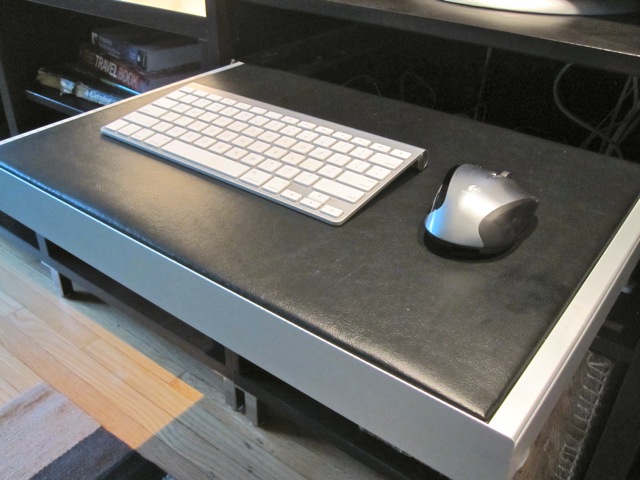
The finished results

Space. The final frontier. Those famous words from the beginning of Star Trek still echo in my head after years of watching Kirk battle cheesy-looking aliens. And for my little beach shack, space really is the final frontier–and that space is at a premium!

I moved into the Big Blue Beach Bungalow nearly 1-1/2 years ago, and at long last (and with thanks to IKEA), I’m nearly finished furnishing the place. My main living area is a long, narrow room that serves a dual purpose. It’s my primary lounging about area, with all my media, the flat-screen, blu-ray player, Xbox, etc.  But it’s also a workspace, with my computer and all the accoutraments.

For a long time, I put up with a cheap $19 ready-to-assemble desk from Walmart. This humble little desk wasn’t much to look at, but sufficed as a short term solution while I completed my vision for the room.

My vision? 12 linear feet of IKEA BESTA storage in black-brown finish. Three units side-by-side, with each unit progressively taller. When I originally moved in, I already had one of the three units (my flatscreen sat atop it). And this month, the collection was completed.

The Problem

There was, however, one small problem. My original vision called for replacing the cheap desk and putting my Mac Mini in the BESTA unit, and my keyboard and mouse (both wireless) on an INREDA pull-out frame with the shelf insert option. The INREDA pull-out frame could be fitted with one of three available options: a compartmentalized tray; a hanging file system; or a shelf insert. The shelf insert works perfectly for a laptop or small keyboard and mouse.

Unfortunately, IKEA discontinued the shelf insert in 2010.

Bummer.

I tried a couple stores for stock to no avail. I checked Craigslist, again with no luck. I even tried the IKEAfans Forum, again with no success. “Screw it,” I thought. I’m fairly handy. I’ll build my own.

My Solution: The Do-It-Yourself INREDA Shelf Insert

The vinyl remnant was just a little long. I only needed trim one side.

The first step was assembling and installing the INREDA pull-out frame. This is easy enough for anyone with a screwdriver and the ability to follow directions.

Next, I carefully measured the opening for the insert. As it turns out, 1/2″ thick plywood is the perfect height for the insert, with dimensions of 19-3/8″ x 13-7/8″. First stop, Lowe’s. I found a 2′ x 2′ x 1/2″ sheet of sanded pine plywood, which the staff at Lowe’s were happy to cut to size for me.

Now all I needed to do was cover it. The original IKEA part was available in either white or black faux leather, and I wanted to do something similar in either black or very dark brown. The friendly people at the neighborhood Denault’s Hardware sent me down the road to Foam n’ Fabrics, where the owner gave me–for free–a remnant of black vinyl that fit perfectly.

I borrowed my neighbor’s staple gun, wrapped the vinyl around the plywood and stapled it to the underside.

I just eyeballed the staples, taking care to keep the vinyl stretched taut.
The corners were folded “gift wrap” style

It fits snugly in the pull-out frame opening, and looks perfect. Total cost? About $6 bucks (and a little bit of elbow grease).