I usually reserve the fun stuff for weekends, but this was too hot to wait. If you’ve got an iPhone and like to play around with photos, you’ve got to check out the ToonPAINT app. You can use the camera or open an image from your photo gallery and it converts it to a comic-book styled image. You’ve seen this style before. It first showed up in the Charles Schwab commercials, and then soon after in the film adaptation of Philip K Dick’s A Scanner Darkly (appropriately set in Orange County).
ToonPAINT does a damn good job without any manipulation. If you want, you can colorize the images afterwards, but even without doing so, you get some pretty interesting results.
Bethany and Dan, comic book style
Here’s a quick test I ran with a photo of my daughter Bethany and my eldest son Dan, taken a few years ago in Laguna Beach.
Other than cropping the “toon” version a little tighter, I didn’t do any further editing to the generated image. Not bad for a completely automated conversion!
You can get ToonPAINT here. It’s not free, but it’s worth the 2 bucks for the entertainment value if nothing else.
If you give it a try, post a link to your experiments in the comments below.
Yesterday I turned on my Samsung Blueray player to tune into Pandora (which sounds amazing cranked through my A/V system). I can count on one hand the number of times I’ve used my Blueray player to watch a disc, but I’m constantly using the various web apps: Netflix, Hulu Plus, and especially Pandora.
As the machine was powering up, I was notified of a system update. I always install updates, and this was not exception. While I love the device, I’ve got to ding Samsung on how they handle these updates. The process itself is smooth and trouble-free, but there’s no information about what the update includes! After some poking around I discovered that a new app to play Vimeo videos was available.
I’ve been using Vimeo for a while now to post videos for SoCal Hiker as well as sharing how-to and usability screencasts. The Vimeo interface is much more pleasant experience than the cluttered crap on YouTube, and Vimeo allows longer videos. As a result, the quality of content on Vimeo is generally much higher than YouTube.
Even so, I’ve never really done much browsing or watching Vimeo stuff on my computer. I typically only watch something when I run across it in the search for something else, like this video tutorial on creating a tilt-shift video. But I was curious to see what this new Vimeo app would do, so I installed it and fired it up.
It’s freaking amazing. Seriously.
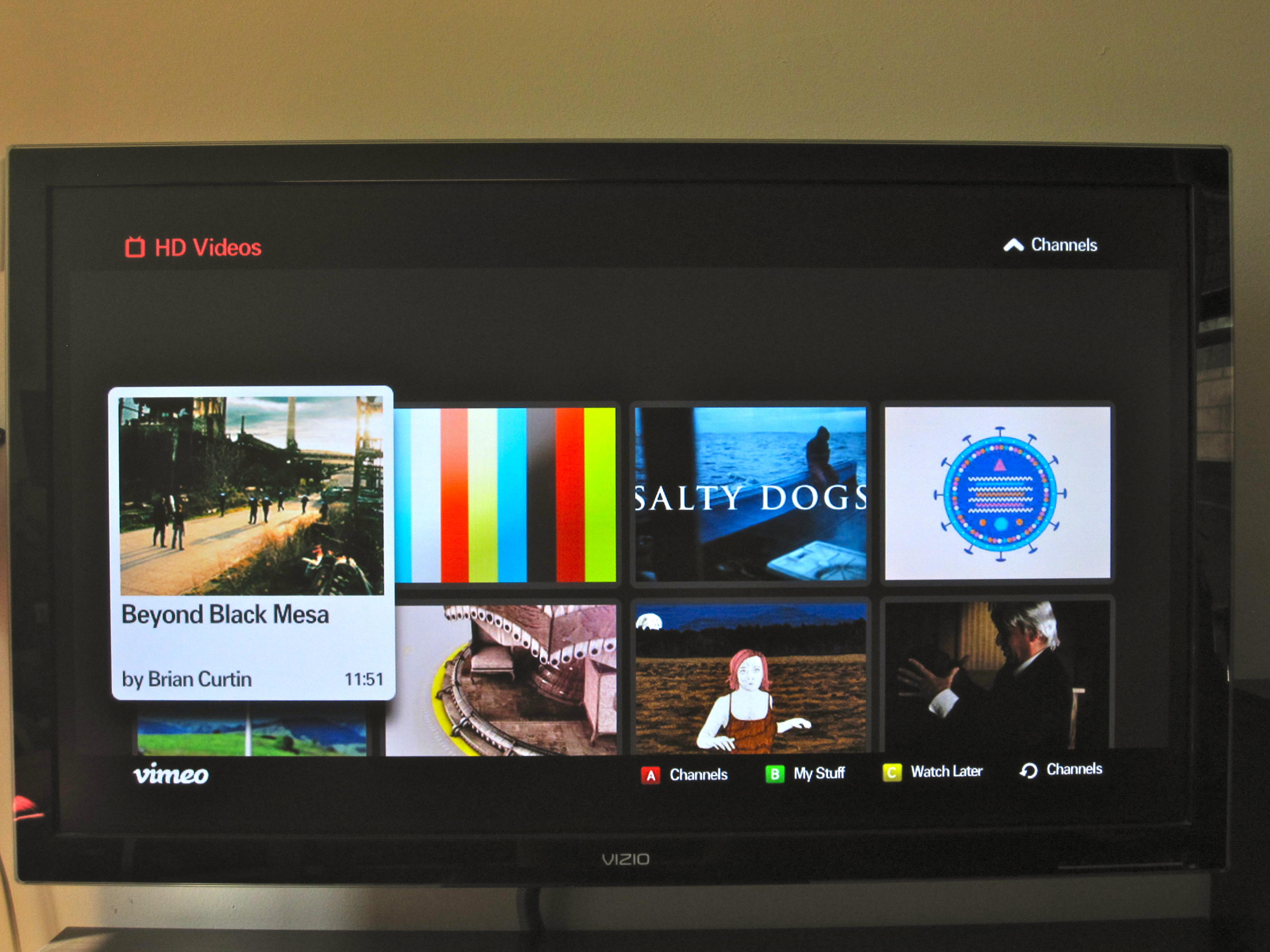
The user interface is clean, hi-def and beautiful. I checked out some of my own videos first (vanity rules), then browsed a few of the curated channels. This is where I was completely, unequivocally sold.
Here’s how it works…
First you select a channel that looks interesting. There’s a number of really nice ones, but the HD channel is a great starting point.
Once you’ve selected the channel, you’ll see a scrolling list of the videos contained in that channel. You can simply hit play or browse through and find something that piques your interest.
William Gibson said, “The future is already here – it’s just not very evenly distributed.” This is the future of television programming, and it’s here now.
Our stores are filled with mediocre products. How many things do you buy that you simple use, but don’t really love? I believe we should design, create and purchase love-worthy products. Apple has done this very well with their iPod, iPhone and iPad devices, but there are plenty of other companies doing good work. I’m going to take some time each weekend to share my favorites. Today, it’s the world’s best iPad case: the DODOcase.
An expensive device like an iPad is naked without a case. An iPad deserves something to protect it from scratches, dings and even the occasional drop. And the DODOcase (affiliate link) does this with style. It is the best case I’ve ever seen for the iPad, bar none.
I first spied the DODOcase at last year’s WordCamp LA. One of the guys sitting in a row near me had one. It caught my eye because I’m a big fan of Moleskine notebooks, and I had been lusting for an iPad since then were first announced. I finally got my iPad last fall, and shortly thereafter ordered my DODOcase.
The DODOcase is handmade in San Francisco using old school bookbinding methods. It has the look of a big Moleskine notebook (my favorite analog note taking device). The sides which cradle the iPad are cut from unfinished bamboo, which is both strong and has a nice paper-like patina. There’s even an elastic band like the Moleskine notebooks that holds the case closed.
The hand-crafted quality of the case is a double-edged sword. On the one hand, the DODOcase is a kick-ass case. On the other, I had to wait nearly four weeks for my case to arrive. Apparently there is a limit to how many of these beauties you can make when you’re doing it by hand.
As you can see from the photos, it’s a beautiful case. But it’s not without a few issues and might not be for everyone. First, it’s one of the more expensive cases out there. Second, like a notebook or a favorite book, it will show some wear over time. I’ve seen it in the corners. And of course, also like a book, it’s not water proof or even very water resistant. And finally, it doesn’t stand up like an easel as some cases do.
But it does look, feel and work amazingly well. Highly recommended.
If you’re interested, you can find out more or order your DODOcase at their website (affiliate link).
“There’s no difference between a pessimist who says, “Oh it’s hopeless, so don’t bother doing anything.” and an optimist who says, “Don’t bother doing anything, it’s going to turn out fine anyways. Either way, nothing happens.” – Yvon Chouinard, rock climber, environmentalist and founder of Patagonia
“Failures don’t plan to fail; they fail to plan.” – Harvey MacKay
These quotes share a common thread and illuminate a problem that is far too common. I see it in companies struggling to implement knowledge management. I see it in communities of practice. You can find it in businesses, organizations, clubs, and even the personal lives of people we care about.
The problem? The absence of a plan.
Historically — and with comic certainty — the gyms overflow in January as we collectively resolve to shed those holiday pounds and get healthy. By the end of the month, the crowd subsides and it’s back to business as usual. What happens? Do people decide that they really don’t want to lose the weight they tacked on? Do they discover that their health really isn’t that important to them? No, the problem is that they have a goal in mind (i.e. lose weight), but only a vague idea of how to get there. What they lack is a plan.
Goals are good and necessary. Goals give us something to strive for, and achieving our goals — be they personal or professional — are largely how we measure success. To get from where you are to where you want to be, you need two things: a goal that is well-defined and measurable, and a plan that — if followed — will help you reach that goal.
The Power of Planning: A Personal Illustration
For years, I had a long-standing goal to hike the John Muir Trail for a second time (the first time being in 1980). This is an arduous undertaking requiring tremendous amounts of planning, preparation and training. I had my goal: hike the entire 211-mile trail, three decades after my first epic journey on the JMT. My goal was well-defined and measurable. And I created a plan that would help me reach my goal.
My plan required coordination my schedule with work; recruiting others to join me on the epic backpacking trip; training my body and getting in shape (I lost 40 lbs. in the process); creating a day-by-day itinerary; planning the meals; getting permits; coordinating transportation, and so on. It was not easy. But it was worthwhile, because it helped me succeed at achieving this longtime goal. In August 2010, 30 years from my first JMT trek, I completed the John Muir Trail for a second time.
Whether personal, professional or business goals, the key is to define your goals, write them down, and create a plan that will help you get there.
A Challenge to You
Here’s my challenge to you. Think of three goals you would like to achieve, either personally, professionally or for your business or organization. You might want to travel to Paris, launch a new initiative at work or go back to school. Whatever the goals, write them down, making sure they are well-defined. They should stretch you or your organization beyond what you know you can easily handle. Then sort out what it will take the achieve those goals. These steps must be something that you have control over, so if you’re counting on winning the lottery, think again. Write these steps down. This is your plan. Follow it, and you can reach your goals successfully.
What goals do you have for 2011 or beyond? Have you create a plan? I’d love to hear them.
Oh and by the way, one of my recruits for my 2010 JMT trek is now my sweetheart. Sometimes success brings unexpected rewards!
As a rule, a website should be self-explanatory; no help required. However there are cases where your customers (I prefer that to “users”) will need your help. Introducing new concepts; changing the interaction; and explaining a complex system are all opportunities to either serve your customer or leave them hanging.
In these cases, help should be readily available when you need it, and unobtrusive when you don’t.
Here are a couple of great examples of online help that really works.
When Facebook introduced their recent changes to the profile page, they offered a tour of the changes that highlighted each new feature without taking you away from your profile. This is awesome, because essentially the guide uses your own profile as an example rather than a generic “Joe Facebook.” The data and examples are all relevant to you because they are yours!
Xero.com is a cloud-based accounting system for business. Accounting is complex, and people tend to be a bit touchy about getting the numbers right, especially when it comes to their own money!
Xeno has done several things really well. They use a “welcome block” to put additional help right in front of new customers. They offer inline, contextual help that doesn’t take your focus from the current page. And they provide links to a more traditional, full-featured help or even live support when you need it.
Another nice touch? Note how the help is clearly identified throughout Xeno with the color orange. The customer will intuitively know when they are looking at help and when they are looking at part of their web app.
Have you seen or designed a great help system? Share it in the comments!
My iPad has officially replaced my trusty Moleskine notebook. Instead of paper and pen, my iPad comes to my meetings, to Starbucks, and pretty much everywhere I go. There are a lot of wonderful apps for the iPad, and I’ll get into them in good time. But one app really stands out in it’s design, beauty and function — Flipboard.
I first read about Flipboard months before I finally plunked down the cash for an iPad, and it had already captured my attention. It’s remarkable in that Flipboard really doesn’t do anything that I couldn’t do before.
What is Flipboard?
Essentially, Flipboard is a different way of reading and consuming media that I’ve already been reading and consuming via other means. What makes Flipboard remarkable is that it does it so elegantly.
Flipboard transforms Twitter, Facebook, Flickr, Google Reader and RSS feeds into a beautiful, magazine-like interface that leverages all the good bits of the iPad. A Twitter stream is noisy and difficult to browse. The same stream through Flipboard is a pleasure. Links, photos and videos show up inline without requiring extra clicks, making browsing your streams not only a pleasure, but making it possible in a new way.
Here are a few screenshots to help tell the Flipboard story. Click any thumbnail to browser the larger images.
I still use Twitter and Facebook, but reading the same streams via Flipboard never fails to surface new and interesting conversations that I might have otherwise overlooked.
If you have an iPad, you must download and use Flipboard. Hell, it’s free.
If you don’t have an iPad, Flipboard might be reason enough to get one.
Earlier today I participated in the weekly KMers.org tweet chat. This week’s discussion was hosted by Kate Bower, discussing the role of self management and self regulation in personal knowledge management (PKM). There was some dissent as to whether PKM required a certain level of obsessive compulsive disorder — OCD — or whether there it was possible to use more of a mad scientist approach to PKM.
To answer the question, you must first define personal knowledge management. What exactly is PKM?
Wikipedia defines PKM as: “a collection of processes that an individual carries out to gather, classify, store, search, retrieve, and share knowledge in his/her daily activities and how these processes support work activities.”
In my view, there are three dimensions to personal knowledge management.
First, you need an awareness of your knowledge. You have to know what it is that you know. This is challenging for many people, whether out of modesty or a lack of self-awareness, but technology is helping. Tools like desktop search and word clouds can help surface the subjects that we have a keen interest in — our likely areas of expertise and knowledge.
Next, you need to be open to learning. Equally important to knowing what you know is knowing what you don’t know, and being open to learning and growing. None of us have a monopoly on knowledge. Some might argue that PKM devalues the need for knowledge sharing with others, but the opposite is closer to the truth. As we understand what we know — and do not know — we see where we can contribute to the larger group. At the same time, we see how we can leverage the knowledge and expertise of others in that group where we have gaps in our own knowledge.
Finally, you must be open to sharing. Unless your tacit knowledge is applied, is it really knowledge at all? What is the value of knowledge that goes unused and unshared? And the beauty of knowledge sharing is that there is an infinite supply. If I give my knowledge to you, I still retain possession. It’s simply multiplied.
As personal knowledge is shared, the entire organization grows and benefits.
During the course of our chat, several members (myself included) described their approach to PKM as that of an mad scientist. I’m not particularly rigorous about folders, hierarchy and information organization. I’d much prefer to leverage technology to help percolate my knowledge to the top.
There are two excellent tools that can help with this.
First, personal search. Simply being able to search my hard drives for the information is often much faster than navigation down a series of folders, especially since search can look beyond file names into the actual content. Search is built into both my Windows 7 PC and my Mac. For email, I use Gmail, which provides super-fast searches through my entire email archive. There are also third-party search tools that will index your hard drive, but I’m quite content with the simplicity of the built-in search.
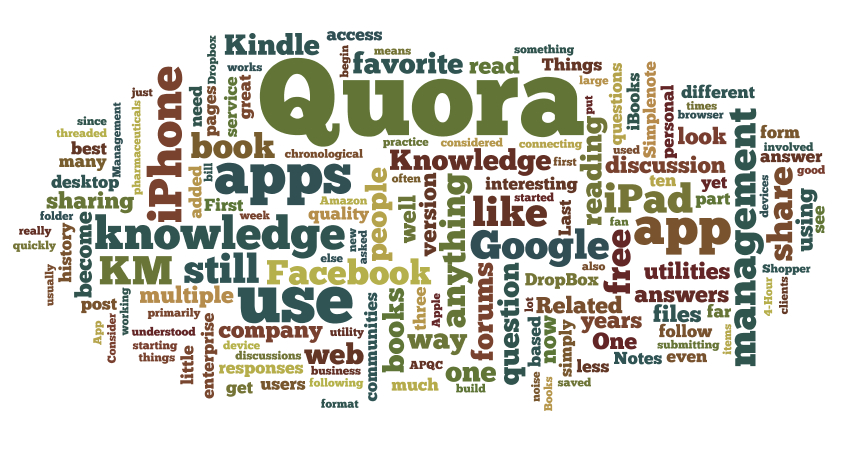
A word cloud generated from my Delicious bookmarks
Second, word clouds. Wordle.net will take your blog or your Delicious bookmarks and automatically create a word cloud based on the topics that appear most frequently. Word clouds are a great way to visualize the relative importance of topics, as the size of each word is determined by the number of times it appears.
These tools are simply aids that will help you divine your interests (and theoretically areas where you might have some budding expertise). The next steps — growing and sharing — are up to you.
What does PKM mean to you, and what tools and techniques have you found useful?






 Historically — and with comic certainty — the gyms overflow in January as we collectively resolve to shed those holiday pounds and get healthy. By the end of the month, the crowd subsides and it’s back to business as usual. What happens? Do people decide that they really don’t want to lose the weight they tacked on? Do they discover that their health really isn’t that important to them? No, the problem is that they have a goal in mind (i.e. lose weight), but only a vague idea of how to get there. What they lack is a plan.
 As a rule, a website should be self-explanatory; no help required. However there are cases where your customers (I prefer that to “users”) will need your help. Introducing new concepts; changing the interaction; and explaining a complex system are all opportunities to either serve your customer or leave them hanging.