Posted on Leave a comment

5 Good Things

On the weekend, I take a little time away from work to nourish my soul. Occasionally, I run across some good things that are worth sharing with you. This weekend, there were five good things that really stood out.

Number 1 – Radiohead released their new album The King of Limbs online one day early. I picked up the downloadable MP3 version for a sweet $9. Their best work since OK Computer.

Number 2 – Friday night after dinner, my girlfriend and I caught opening night of Unknown. Liam Neeson stars as Dr. Martin Harris, who awakens four days after a car accident in Berlin to discover that his wife suddenly doesn’t recognize him. It was pretty good up to a point. I don’t make it to the theater often, and this flick made for a fun night out.

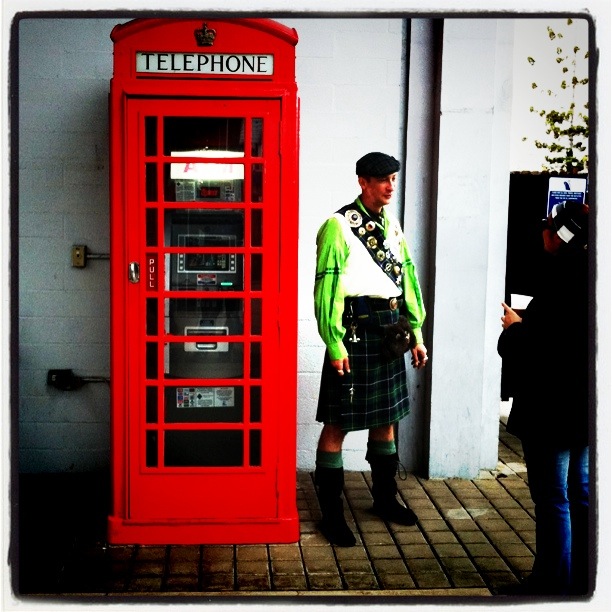
Number 3 – Saturday we spent the afternoon at the 18th Annual Scottish Festival and Games at the Queen Mary in Long Beach. Annie has a Scottish lineage, and was happy to bring me along. The clouds threatened to rain, but we lucked out and did it all. We saw the pipe and drum parade; ate Scottish meat pie and bangers; watched the Highland Games; saw border collies herding sheep; sampled a variety of single malt Scotch; and naturally perused the various vendor booths. I don’t think I’ve ever seen so many kilts in one place. It’s a one weekend affair, but if you haven’t gone before, I highly recommend it (next year, of course).

Number 4 – Speaking of single malt scotch, we attended a wonderful tasting hosted by Ray Pearson. He bills himself as “The Whiskymeister”, and gave us an education on the various distillery regions of Scotland and the process that goes into creating single malt scotch. Of the four we tasted, my favorite was Bowmore, from the Islay region. It’s a smoky, peaty single malt similar to Laphroaig.

Number 5 – Finally, this morning I read about Adele’s new album, 21 in the paper and placed my preorder on iTunes. She’s a talented vocalist, and it’s hard to believe she’s only 21 years old. It’s due out on Tuesday, but I’m certain to enjoy it.

There you have it… five good things worth checking out.

For those of you who have President’s Day off tomorrow, think about me while I’m at work!

Posted on 1 Comment

Piping Hot Blackbird Pie

“Sing a song of sixpence,
A pocket full of rye.
Four and twenty blackbirds,
Baked in a pie…”
Sing a Song of Sixpence, popular nursery rhyme*

Growing up, we all sang the familiar song. Thankfully, I’ve never tasted blackbird pie (nor do I desire to). I never even really thought much about what I was singing as a child, otherwise I might have gagged.

Fortunately, there’s a new kind of Blackbird Pie that’s actually quite tasty. I’m referring of course to the fantastic Blackbird Pie plugin for WordPress.

The Blackbird Pie plugin let’s you easily quote a tweet with the links and look of the original tweet, like this:

[blackbirdpie url=”http://twitter.com/#!/jeffhester/status/39511689892339712″]

Blackbird Pie adds an icon to the TinyMCE visual editor. When you are editing your post, click the Blackbird button and you’ll see a screen that let’s you paste in the URL to the tweet you want to share, or search for a tweet.

My original tweet. The URL is highlighted and copied to the clipboard.

Here’s the dialog for inserting a tweet:

The sweet thing about Blackbird Pie is that all the links that would be “live” in the original tweet are live in your post as well, including linked Twitter handles, the client used and any links.

The Twitter API is called only the first time. The generated HTML is stored in a hidden custom field so subsequent loads won’t rely on Twitter uptime.

If you ever have occasion to post a tweet on your WordPress-powered website, Blackbird Pie is a must-have plugin. And it’s also supported on WordPress.com, too!

*Incidentally, some say the 24 blackbirds baked in a pie refers to an actual historical event. Who knew?!

Posted on 3 Comments

Gaming, Circa 1974

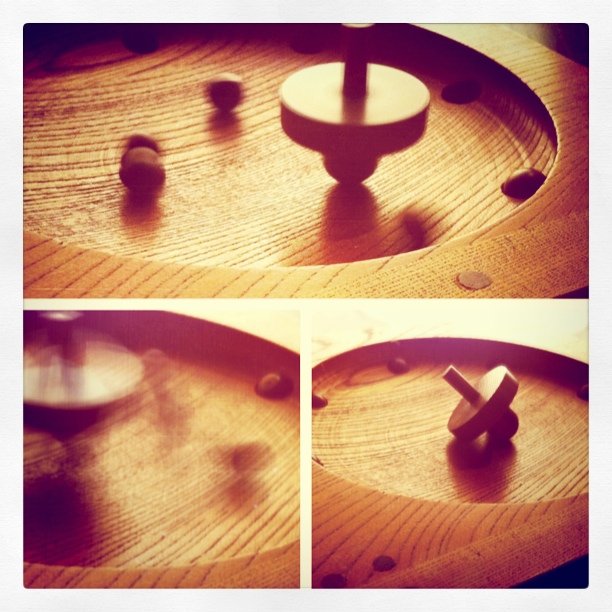
As long as I can remember, this simply designed wooden game sat on the coffee table in my grandparents living room. Growing up, I loved playing the game with my grandpa and grandma. The gameplay was simple. You spun the top, hoping it knocked the eight wooden balls into the eight divots. Each divot had a point value. Once the top stopped, you added up your score. Your opponent took their turn, and you repeated until you were tired of playing or dinner time arrived — whichever came first. Dinner usually won.

This was all long before the age of Mortal Kombat, World of Warcraft and even before the Internet (as we know it today). I didn’t care (not that I knew better). The game was just fun!

My grandparents have both since passed on, and the game now sits on my coffee table, in my living room. And the game still makes me smile. Partly, it’s the memories that it brings me. But a big part is the simple joy of a well-designed game. No batteries required.

Sometimes in life, it’s the simple things that bring us joy.

I shot these photos with my iPhone 4 mounted on a GorillaMobile tripod. To capture the motion of the spinning top, I used the Slow Shutter Cam app. I created the collage with Diptic and stylized it to give it a “70’s” look and uploaded with Instagram. I’m really pleased with the results.

Sometimes in life, it’s the complex things that bring us joy.


Posted on 3 Comments

Translation? There’s an App for That

Translation has long been a tough thing to do with any degree of accuracy. Remember “All your base are belong to us?

When Google Translate was introduced on the web years ago, it was an impressive and useful tool — even if it didn’t do a perfect job. Well the tools have progressed. Google Translate on the web added the ability to not only read the translation, but hear it spoken.

Of course, the missing bit in all of this is mobility. When you’re traveling abroad and speak just enough to eek by, it’s helpful to have a phrase book or dictionary. Or it was. Now Google has effectively rendered all those dedicated translator devices, phrasebooks and dictionaries obsolete. All you need now is an iPhone (or Android… I’m told) and their Google Translate app.

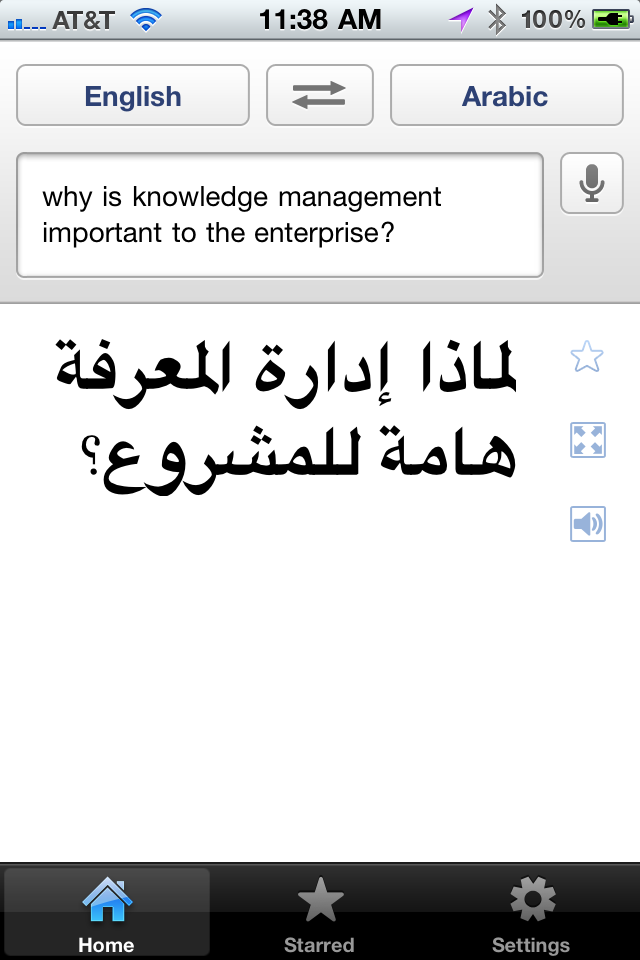
The new app offers several nice features. First, you don’t need to type. Just speak into the phone, select the language you want it translated to, and the app will show you the translated text. Google Translate on the iPhone supports voice input for 15 languages, translation into more than 50 languages, and you can hear the phrase spoken in 23 supported languages.

You can also hit a button to display the translated phrase full screen, to show to your taxi driver or waiter, for instance. And instead of spending a bundle of money on a dedicated translator device, you can get this app (it’s free) and use the savings on your trip!

There is one important caveat. The Google Translate requires an Internet connection. I tested it over both wifi and 3G, and it worked fine, including listening to the translated phrase in the target language. But this is becoming less and less of an issue. I’ve used my iPhone all over the world, from Chile to Abu Dhabi and throughout Europe with no problem.

Cette application va être utile quand je Voyage à Paris plus tard cette année!

Posted on 4 Comments

LunaTik & TikTok Unboxed

LunaTik and TikTok are a pair of wrist bands specifically designed to turn your iPod Nano into a multi-touch wrist watch. These beautiful watch straps were designed by Scott Wilson, former creative director at Nike Watches and founder of the Minimal design studio. They are beautifully designed and perfectly matched to the Nano. The best complement I can make is that if Apple designed a wrist band for the iPod Nano, it would probably look like this.

What really makes this band interesting was the way Scott and the Minimal team developed it. They had a great idea for converting the iPod Nano into a multi-touch watch, and to raise the capital they needed to take the bands from concept to production, they turned to Kickstarter. Kickstarter  allows people with an idea for a product, production or service to recruit micro-investments. The “investors” give a few bucks (or more), and rather than getting a share of ownership, they get the satisfaction of supporting someone with a great idea achieve their dream. And in some cases (as with TikTok and LunaTik) you get something in exchange.

Scott smartly put together great donor levels incentives. Pledge $25 or more and get a TikTok band. Pledge $50 or more and you got a LunaTik iPod Nano watch conversion kit. For $70 or more you got both. There were even bigger, fancier packages. In Scott’s case, their goal was to raise $15,000 — the minimum they felt they needed to justify the cost of going to production. They set a pledge deadline of December 16, but the response surprised them.

In the end, 13, 512 backers pledged a total of $941,718!

Needless to say, the project was a success, not only for Scott Wilson and Minimal, but for Kickstarter as well. Not that it wasn’t without some bumps in the road. Fulfillment was fraught with problems, as it turned out Kickstarter allowed people to pledge money without giving full addresses — obviously necessary for those getting the watch bands.

Scott did a great job of keeping the backers up to date with regular emails outlining the progress. He included photos as he travelled to China to meet with the manufacturer and shared videos of the bands being made.

A few notes about TikTok and LunaTik

  • The are designed to work with the 6th generation iPod Nano (the current model, as of Feb. 2011).
  • The iPod Nano is not included.
  • It is super easy to remove the iPod Nano from the TikTok. Snap it in; snap it out.
  • The LunaTik, on the other hand, is accurately labeled a watch conversion kit. While you can technically take your iPod Nano back out, it takes a couple special tools and some time.
  • They are big, but there are bigger watches out there. It’s definitely more of a man-sized watch though (sorry ladies).

The final product? See for yourself. Click any image below for a larger version.

Check out other projects on Kickstarter, learn what else Minimal has been designing, and if you’re interested in the LunaTik and TikTok watch bands, you can find out more at LunaTik.com.

One Last Thought

Someone is probably wondering why I would need both a LunaTik and a TikTok band, after all, I only have on iPod Nano. The reality is, I do not need both. I am thinking of a clever way to give one away. If you’ve got any ideas, leave me a comment!

Posted on 5 Comments

Managing Your Editorial Calendar in WordPress

I can see the headline now: “Time travel is now a reality,” says leading WordPress scientist.

One of the features that many people either 1. never learned about or 2. forget that it is there is the ability to schedule posts for publication at a specific date and time.

By default, when you initially publish a post or page, or save a draft, WordPress will grab the current date and time and use this as the publication date. You can override this to either back-date a post or post date for future publishing. This is great for scheduling posts when you know you want to announce something when you will be offline, or when you need to embargo information until a particular time.

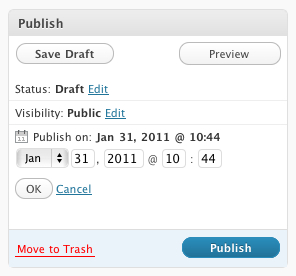
To change the publish date, simply click the edit link in the Publish block and you’ll gave options to set the month, day, year and time of the post. Yes, time travel really is possible.

Note that if you select a date in the future, the Publish button smartly changes to a Schedule button. Pretty clever.

If you are going for consistency over time, another great tool is the Editorial Calendar plugin available in the WordPress plugin repository. This adds a new Calendar link in your Posts menu, which then displays a scrollable calendar showing all your posts plotted over it. From here you can add new posts, schedule posts for future publication and get a clear picture of when articles need to be ready. Here’s a screencast from the plugin author Zack Grossbart that shows all the bells and whistles.

I’m using this more and more as I add rigor to my publishing schedule as part of my project for 365 posts in 365 days. I’m able to slot in topics that I know I want to cover, and do it on a timeline that makes sense. I can collect my thoughts in a draft mode, then polish up the post before publication. If I finish early, I just schedule the post to go live on the selected date.

What tips and techniques do you use to manage your editorial calendar?