Posted on — 12 Comments

What is the WordPress KM Project?

Knowledge Management is a term laden with baggage. For some people, KM synonymous with expensive IT systems and tools. For others it conjures memories of failed initiatives from a time past. But for most people, KM is a concept that they really don’t get.

Not that they need to “get it.” The term itself was invented by academians and consultants conspiring to elevate their science. But when the rubber meets the road, KM is simply about sharing and leveraging knowledge intelligently. The typical knowledge worker isn’t usually familiar with the term knowledge management or even knowledge worker. They just know that they need to tap into knowledge and expertise to help them do their job.

And so, we KM professionals are tasked with providing a systematic approach to KM that doesn’t burden knowledge workers with learning a whole new language. Taxonomy, vocabulary, subject matter experts, communities of practice — all are misguided labels that serve the KM professionals (we know what we mean) but obfuscate the message to the engineer on a project.

We need to put the process into terms they already know and understand. In many ways, Enterprise 2.0 concepts come closer. Blogs, social networking, profiles and discussion forums are all part of our common experience of the web. And they all fit nicely into a community-centric approach to knowledge management.

I’ve said many times that KM is not about the tool. Successful KM is more about the processes and behaviors that drive collaboration, knowledge sharing and reuse. Show people how they benefit when they share their knowledge and it doesn’t matter what the tool is. As long as that tool doesn’t impede your ability to connect with knowledge and the people who have or need expertise, which tool is almost irrelevant. Not exactly the message that the big software vendors want you to hear, but it’s true.


Which got me thinking: if it’s not about the tool, why not choose some tools that are readily and freely available? Could this not make KM accessible to many more companies, and perhaps spawn a new era of extra-enterprise collaboration?

Thus was born The WordPress KM Project. The goal is to create a community-centric knowledge management platform that leverages freely available and easily deployed technology — WordPress.

WordPress is primarily considered blogging software, but it can be much more. A single WordPress installation can now support multiple sites or communities. Plugins such as the BuddyPress suite add discussion forums and extensible user profiles. And the core WordPress system is already well-suited for content creation and management.

What are the key requirements for the WordPress KM Project?

  • User Management – Each user must have a profile that can contain contact information as well as skills and expertise. This is important in establishing context and building trust among people who may not know each other.
  • Communities – The core management of knowledge and expertise is delegated to domain experts. People interested in that domain are the primary participants of these communities.
  • Enterprise scope – Although knowledge and expertise is delegate to communities, the partipants have access to the full breadth and depth of knowledge across all communities.
  • Search – For most people, this will be the primary method of retrieving needed knowledge or expertise. For that reason, search — by default — must cross community boundaries.
  • Discussion – The primary medium for ad hoc collaboration and knowledge sharing. Each community will have discussion forums centered around the subjects relating to their domain expertise.
  • Blogs – This could also be considered news, but carries the advantage of allowing community participation through comments.
  • Knowledge – This is experience codified. Explicit knowledge stored in web page or other electronic form.

The goal of the WordPress KM Project is to build a working prototype environment, and then share the results with the world. To do this well, I need your help.

Do you have a passion for KM, WordPress, enterprise systems or just contributing to the greater good? I want to hear from you. Get involved, share your ideas, and join the team.

Let’s begin. Start by leaving a comment below.
Posted on — 2 Comments

Another WordPress Project Launched

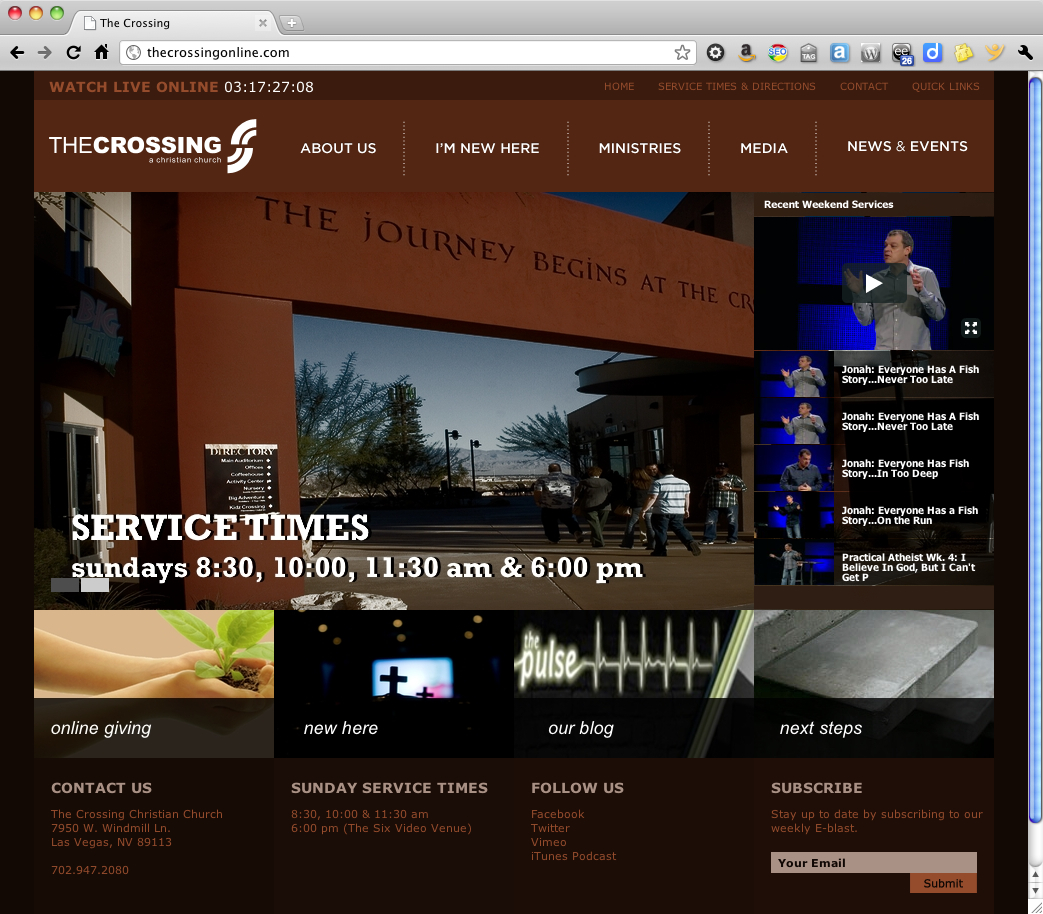
Most people, when they think of WordPress, assume it’s for hobbyists and bloggers, and the the design will look like a template. The Crossing proves this assumption wrong. The website isn’t a blog in the usual sense, but a great example of how WordPress can be used for pure content management with a unique style of its own.

For this project, my friends at PlainJoe Studios created the site design and architecture, with complete Photoshop mockups. Based on their design, I built a custom WordPress child theme using the StudioPress Genesis framework. The final product includes some great features, including a widgetized homepage, a dynamic video gallery fed via Vimeo, and slick access to the site map via the Quick Links in the header (give it a try!).

Best of all, the client can easily manage their own website content. And that is something to give praise for.

WordPress — it’s not just for blogging.

Do you need a website that works for you (instead of against you)? I can help. I have a network of design and developer resources that team together to deliver dynamic, high-performance websites. Our team is known as Room Five, and we’re here to help. Contact me for details.


Posted on — Leave a comment

Join Me at WordCamp OC

I’ve been a huge fan of WordCamp ever since attending my first WordCamp in San Francisco back 2007. WordCamp is a great, inexpensive way to learn and network with fellow WordPress fans.
Now WordPress users in Orange County and through Southern California have the second annual WordCamp OC to look forward to. Organized by Jeffrey Zinn and Brandon Dove of PixelJar, this year’s even will be held on May 14th at Chapman University in Orange.

Look forward to seeing you there!

Read more at 2011.oc.wordcamp.org.

Posted on — 5 Comments

Backing Up Your WordPress Site

There are a lot of different methods you can use to backup your WordPress website, but if you like simplicity and automation, there are only two that matter. Rather than blather on with a long list of plugins or instructions for using phpMyAdmin or cpanel, just buck up, choose one of these and sleep easy at night knowing your website is backed up.

Option #1 – VaultPress

VaultPress is a service from Automattic — the people behind WordPress.com, Akismet and many other fine products and services. Although it’s still in beta, it wasn’t difficult for me to get on the list. I submitted my email, and within a few days received my “golden ticket.” Ironic how “you win!” translates to “you get the privilege to pay us!”

At any rate, once you’ve setup your VaultPress account and billing — that’s right, it’s not free — you install a plugin on your site. The service a commercial service tied to a monthly subscription. I’m using it on a couple of my websites and pay $15 per month, per site. Yes, it’s a steep option if you’re just dabbling, but if you run a business on WordPress, it’s a small price to pay. Pony up $40 a month and they add real-time security monitoring.

For that fee, VaultPress continuously monitors your site for any changes, and automatically and transparently backs it up. A change to the database (including comments to a post) or a new page or media upload — any change triggers the backup. And the backup is intelligent enough to do it all in increments, meaning one little change won’t trigger a full backup of the entire website.

Option #2 – BackupBuddy

BackupBuddy is a commercial plug-in with a one-time cost of $45 for up to two sites with volume license options for people with up to 10 or even more. BackupBuddy installs as a plugin, and then you can configure it to create either a full backup (database + files) or a database-only backup. You can run backups on demand, or schedule recurring backups. And you can download the backup to your local computer, or configure BackupBuddy to send automatically send it to another server via FTP, email or Amazon S3.

But if you develop websites, there’s another reason to use BackupBuddy. It makes transferring a site from server to server (like from your development server to production) drop-dead simple. I know people who have even done this from their iPhone — it’s that easy. Definitely worth it for smaller sites that just want peace of mind or developers who want to simplify their lives.

What are the differences between BackupBuddy and VaultPress? As mentioned before, VaultPress watches for any changes to your site and then automatically and incrementally backs up those changes. BackupBuddy basically does backups (full or database only) either on demand or on a predefined schedule. Your configuration and choice is going to depend on your tolerance for risk. If you backup the site once each day, it’s possible that you could lose some changes, but no more than 24 hours worth. For most sites, this is probably a reasonable trade-off.

Bonus Feature – Amazon S3

I’m feeling generous tonight, so I’m throwing in a bonus for free. Sign-up for Amazon S3. Amazon Simple Storage Service — or simply Amazon S3 — is storage in the cloud, and it’s damn cheap. No, it’s not free, but for a site like this, I can store a complete backup for literally pennies per month. Couple that with BackupBuddy and you can automate the entire process.

I have heard about Amazon S3 for a long time, but was reluctant to try it because it sounded complicated. It’s not. If you can manage a WordPress site, you can manage an Amazon S3 account.

While I was writing this post, I signed up for Amazon S3, activated my account, configured BackupBuddy to send the backup to S3, completed a backup and verified that it was transferred. It was so simple and so painless that I was kicking myself for not doing so sooner.

The Bottom Line

If you have a mission-critical website and rely on it for income, sign-up for VaultPress. If you have limited funds or develop WordPress sites for others, get BackupBuddy. Simple, no?

Posted on — 2 Comments

WordPress 3.1 Arrives

It’s been a long time coming, but WordPress 3.1 is officially released! Code named “Reinhard” after jazz great* Django Reinhard, WordPress 3.1 includes some great new functionality.

A few key highlights:

  • Easier to add internal links in a post or page with a killer lookup.
  • An amazing new post formats feature that allows theme developers to present several different kinds of posts in their own unique style. The formats have been standardized, with eleven available formats. Theme developers can choose to make these available or not, but to help ensure compatibility between themes, they cannot introduce new formats (unlike post types).
  • Sortable columns in the admin screens make it easier for any site with more that 20 posts or pages to filter and find the content they need to edit.
  • And the new Admin Bar — which you either love or hate — gives you quick access to key admin activities right from your site.

I’ve already updated my sites to 3.1 — a relatively painless task when your themes are coded properly — and recommend you do so on yours. Keeping your WordPress installation and plugins updated helps make your site less vulnerable to hackers.

I’m still familiarizing myself with the new functionality in 3.1, but there are already some great overviews if you want to learn more.

Have you updated your WordPress site? Read up and dive in!

*All WordPress releases have had code names based on jazz musicians. Matt Mullenweg may not be a poet, but he loves jazz music.

Posted on — 1 Comment

Piping Hot Blackbird Pie

“Sing a song of sixpence,
A pocket full of rye.
Four and twenty blackbirds,
Baked in a pie…”
– Sing a Song of Sixpence, popular nursery rhyme*

Growing up, we all sang the familiar song. Thankfully, I’ve never tasted blackbird pie (nor do I desire to). I never even really thought much about what I was singing as a child, otherwise I might have gagged.

Fortunately, there’s a new kind of Blackbird Pie that’s actually quite tasty. I’m referring of course to the fantastic Blackbird Pie plugin for WordPress.

The Blackbird Pie plugin let’s you easily quote a tweet with the links and look of the original tweet, like this:

[blackbirdpie url=”http://twitter.com/#!/jeffhester/status/39511689892339712″]

Blackbird Pie adds an icon to the TinyMCE visual editor. When you are editing your post, click the Blackbird button and you’ll see a screen that let’s you paste in the URL to the tweet you want to share, or search for a tweet.

My original tweet. The URL is highlighted and copied to the clipboard.

Here’s the dialog for inserting a tweet:

The sweet thing about Blackbird Pie is that all the links that would be “live” in the original tweet are live in your post as well, including linked Twitter handles, the client used and any links.

The Twitter API is called only the first time. The generated HTML is stored in a hidden custom field so subsequent loads won’t rely on Twitter uptime.

If you ever have occasion to post a tweet on your WordPress-powered website, Blackbird Pie is a must-have plugin. And it’s also supported on WordPress.com, too!

*Incidentally, some say the 24 blackbirds baked in a pie refers to an actual historical event. Who knew?!

Posted on — 23 Comments

29 Posts in 29 Days

Click for the original Olibac image on Flickr
Photo credit: Olibac

On January 5, 2011,  I committed to writing a post a day for 365 days. After 29 days, I’m happy to report that I’m on track with 29 posts in 29 days. All it took was a little nudge from Scott Berkun and the other good folks at WordPress.

Just about one month into the routine, I’ve made a few observations that might be of use to anyone else considering a similar challenge.

  1. Writing a post a day takes discipline. In hindsight, I realized that I implied a post a day on this blog. That alone is a commitment (I already have a full-time career). And I promised “no fluff” — I want to write posts of the same quality that I like to read. Compounding the commitment are my work commitments and other websites, and you quickly see how a post a day is just the tip of the iceberg.
  2. Planning is essential, as I noted in post #17/365. I’m using the draft status to collect ideas and thoughts on articles I want to write, or to align publication with related events. I collect my thoughts over days and weeks, and this has greatly simplified the process of sitting down to actually write the finished article.
  3. Brainstorming helps, too! I tap into resources from Facebook and Twitter. I gain a lot of ideas from scanning my feeds on Flipboard or reading sites like The Daily Post which share topics and ideas for writing.
  4. Most of all, the support of the community helps keep you going! I have the good fortune to have a great girlfriend who inspires me (check out her blog), and a number of friends in the local WordPress and social media community here in Orange County who keep me challenged. Many thanks go out to Darin McClure, Holly Schwartz, Suki Beasla and Matthew Gallizzi. We all meet at SMMOC several times a month, and all have taking up the call to write one post a day. And we use Twitter every day, encouraging and challenging each other to keep up the cause.

The icing on the cake? I’m having fun! I have a lot to write about — much more than I have time to write. So far there is absolutely zero chance that the well will run dry. That may be either a blessing or a curse depending on your opinion of my stuff, but I’m having a good time, and more than a few people are taking the journey with me.

It’s ironic. I kicked off this year with a photo project called Project 365, where I shoot at least one photo a day for the entire year. I had heard of this before from a friend, but decided to jump in and give it a shot. There has been a synergistic relationship between the two projects. Sometimes my photo of the day will spawn an idea that I simply must write about, and sometimes the article will inspire a creative photo.

How about you? Are you taking on a post- or photo-a-day challenge? Maybe you have in the past? What has your experience been?