Posted on — 5 Comments

Managing Your Editorial Calendar in WordPress

I can see the headline now: “Time travel is now a reality,” says leading WordPress scientist.

One of the features that many people either 1. never learned about or 2. forget that it is there is the ability to schedule posts for publication at a specific date and time.

By default, when you initially publish a post or page, or save a draft, WordPress will grab the current date and time and use this as the publication date. You can override this to either back-date a post or post date for future publishing. This is great for scheduling posts when you know you want to announce something when you will be offline, or when you need to embargo information until a particular time.

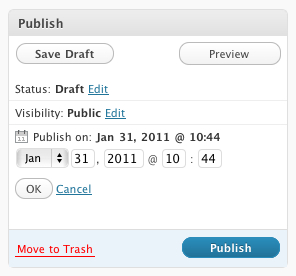
To change the publish date, simply click the edit link in the Publish block and you’ll gave options to set the month, day, year and time of the post. Yes, time travel really is possible.

Note that if you select a date in the future, the Publish button smartly changes to a Schedule button. Pretty clever.

If you are going for consistency over time, another great tool is the Editorial Calendar plugin available in the WordPress plugin repository. This adds a new Calendar link in your Posts menu, which then displays a scrollable calendar showing all your posts plotted over it. From here you can add new posts, schedule posts for future publication and get a clear picture of when articles need to be ready. Here’s a screencast from the plugin author Zack Grossbart that shows all the bells and whistles.

I’m using this more and more as I add rigor to my publishing schedule as part of my project for 365 posts in 365 days. I’m able to slot in topics that I know I want to cover, and do it on a timeline that makes sense. I can collect my thoughts in a draft mode, then polish up the post before publication. If I finish early, I just schedule the post to go live on the selected date.

What tips and techniques do you use to manage your editorial calendar?
Posted on — 3 Comments

U.S. Speed Sport Goes Live

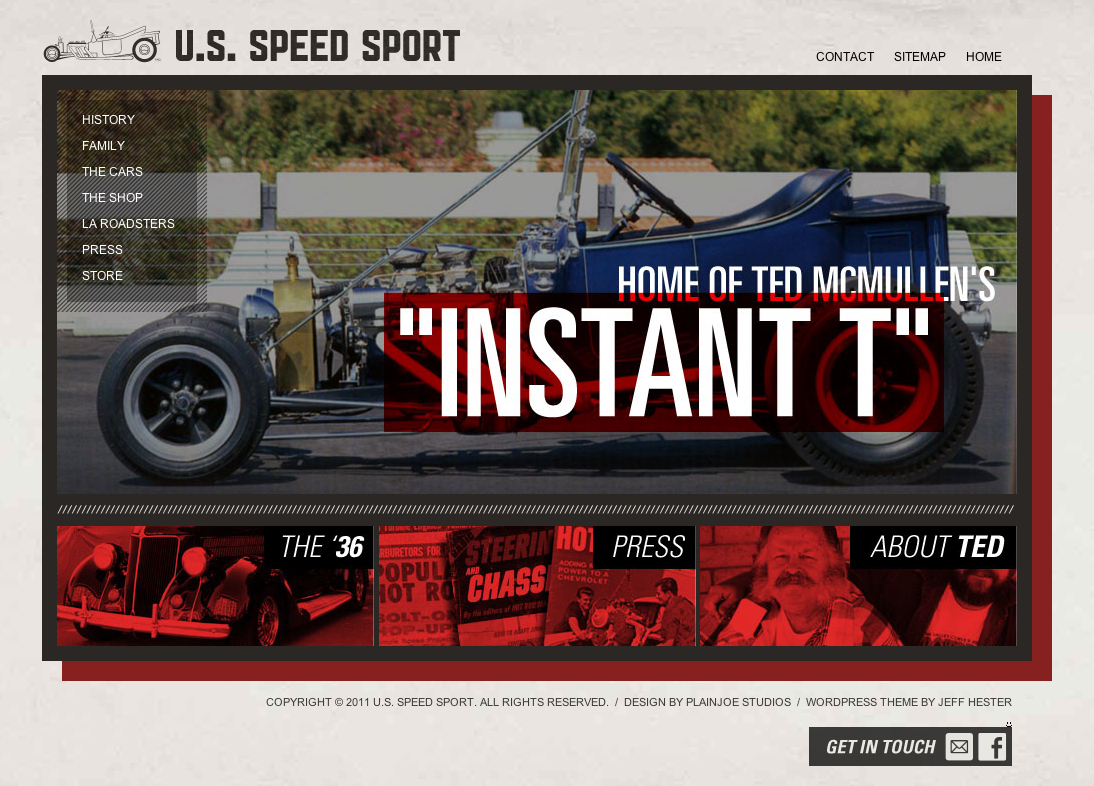
One of my latest projects went live this weekend. U.S. Speed Sport is devoted to the memory of one of the pioneers of hot rodding, Ted McMullen and his company U.S. Speed Sport.

It’s a WordPress powered site using a custom theme I built on the Studiopress Genesis framework. Why build on the Genesis framework? Genesis provides strong search engine optimization out-of-the-box, dead-simple WordPress upgrades and a great set of core widgets. Now the client can add pages, customize menus and change images on the homepage or headers without requiring a developer.

U.S. Speed Sport also uses Gravity Forms for intelligent form design and handling, and Slickr Flickr to integrate photo galleries hosted on Flickr.

Check out U.S. Speed Sport.

Posted on — Leave a comment

Meet Me at WordCamp San Francisco

This year WordCamp San Francisco celebrates it’s fifth anniversary. I attended the first WordCamp SF way back in 2007. It was a much more intimate affair back then, and the sense of community was unmistakable.

Five years later, the event has grown to three days, and a much bigger venue than that humble beginning. The dates for WordCamp SF and venue have been confirmed: August 12-14 at the Mission Bay Conference Center. According to Jane Wells, the tentative plan is to focus programming for publishers on Friday, bloggers on Saturday, and developers on Sunday.

Who should go to WordCamp SF?

If you work with WordPress, whether for your own sites or clients, WordCamp provides a unique opportunity for intensive learning and community building. You’ll rub elbows with others who love and use WordPress, everyone from designers and developers to small-time bloggers and big corporate names (yes, they use WordPress too!).

The first ever WordCamp SF back in 2007

WordCamp SF is the biggest and original WordCamp, and is where Automattic’s Matt Mullenweg delivers his annual State of the Word address. WordCamp SF is different from the many excellent local WordCamps. While the local events generally focus more exclusively on WordPress, the San Francisco event pulls in some big name speakers talking about bigger topics.

I highly recommend attending a local WordCamp for the intensive learning and networking opportunity with local WordPress folks. For me, I attend WordCamp OC (I helped Brandon Dove and Jeffrey Zinn of Pixel Jar organize last year) and WordCamp LA. This year, I’ll probably be found at WordCamp San Diego, too.

Another great local option? Check out Meetup.com for local WordPress user groups. We are fortunate here in Orange County to have a very active group organized by Jeff Turner and Steve Zehngut of Zeek Interactive.

If you can swing the trip to San Francisco, also attend WordCamp SF for the inside scoop and the inspiration. It’s a big event, and like any big conference, it helps to network with other attendees before you go to make the most of the trip.

You can find a complete list of local WordCamp events at WordCamp Central. For instance, this very weekend there’s WordCamp Phoenix (Hey guys, look forward to hearing all about it!).

Mark your calendars for WordCamp SF, and be sure to let me know if you are planning on attending. We’ll meet up for a cold beverage!

Posted on — 5 Comments

Project 365 – A Post a Day

Creating content on a regular basis can be challenging. Some so-called blogging experts suggest that you need to post regularly to build your audience. That may be true if that aligns with your goals, but I agree with Scott Stratton’s theory. I heard him speak a couple months ago at a Linked OC event, and he reiterated what he says in his book UnMarketing (affiliate link): that quality is far more important than quantity. If you don’t have something that you simply must share, then it probably isn’t worth sharing.

Or as Scott puts it, people don’t share “meh.” People share emotion. People share what moves them. People share awesome.

On the other side of that coin is the view that as with anything, practice makes perfect. If you want to become a better guitarist, photographer or writer, you need to do that, and do so with some degree of frequency.

That, in part, is one of the ideas behind Project 365, a photography meme popular on Flickr and beyond. The idea is simple. Take one photo every day for one year, and share it online.

I first learned about Project 365 when my friend Ed took on the challenge, and I saw his photography improve by leaps and bounds. And so I decided on January 1st, it was my time to embark on that journey. I’ve started my first Project 365, and I’m looking forward to seeing the results this time next year.

So then yesterday I read on Mashable that the folks at WordPress had issued a similar challenge to the blogging world: write a post a day for a year.  They’ve even created a website titled The Daily Post with ideas for writing.

Now those who have followed this blog on and off over the years know that I have been anything but regular about writing. I tend to write in frenzied spurts. But the idea of such a disciplined approach to writing was seductive, and I took the bait.

Yes, I realize I’m not starting this project on January 1st. There are no rules except for those I create, and those are subject to change. But from here on, I’m going to give it a shot… a quality post a day for the next 365 days.

One down, 364 to go.

Posted on — 2 Comments

Expanding my Knowledge at WordCamp LA

My Saturday mornings are usually either 1) a day to sleep in after a late night Friday or 2) a day to get up early and hit the trailhead, climbing one of my favorite local mountains. Today, I broke that mold, getting up early to feed my brain at WordCamp LA.

My first WordCamp experience was at WordCamp San Francisco back in 2007. This past year, I worked with Brandon Dove and Jeffrey Zinn to help organize WordCamp OC. WordCamp is a great way to immerse yourself in the WordPress community and learn a lot in a short time from some really brilliant people.

Some people are put off by the thought of attending WordCamp, thinking it’s too advanced for them, but there really is something for everyone — developers, designers, bloggers and people just thinking about blogging — all of them have something to gain.

Chances are good there’s a WordCamp in your area. If you are using WordPress, or even considering using WordPress, check out the schedule of upcoming WordCamps and sign up! You’ll be glad you did.

Oh, and if we met at WordCamp LA, leave a comment or send me a tweet @jeffhester with the hashtag #wcla.

Posted on — Leave a comment

Visual changes in WordPress 2.7 revealed

A few days ago, the WordPress blog unveiled the visual design of the upcoming WordPress 2.7 expected to be released in a few weeks. While this won’t offer dramatic changes to readers of this or any other WordPress-powered blog, it offers some really nice improvements for those of us who publish a blog. 

Here’s a preview of the new dashboard:

The new dashboard is really a great improvement, with at-a-glance views of the stats effecting your blog. I also like the “quick post” feature and the ability to reply directly to comments. An already amazing product is getting even better. 

Posted on — 8 Comments

Project Friday

My schedule this week gives me this Friday to do whatever the hell I want. And today, what I want entails tackling some personal projects that have been hovering overhead for some time. And I’m using Things for the iPhone to help manage it all. 

Things is a nice little commercial iPhone app that dovetails with David Allen’s Getting Things Done (GTD) methodology for time and task management. I was using Todoist for a while, which is a nice, free web-based to-do list. I experimented with Jott, which is notable for its voice-driven interface. But so far, I like Things simple, no-nonsense interface. 

So what’s on my plate today? 

First, I’m doing a little rearranging right here. I’m updating the blog theme to make better use of screen real estate in general, and the right column in particular. I’m also going to be updating WordPress and some 

plugins in preparation for next month’s release of WordPress 2.7. And I’ll be adding the top content, making it easy for new readers to find the “greatest hits” (yes, there are a few). 

Next, I’ll be working on my two big forum sites, GetGamer and BigBlueBall. I use vBulletin on both, and they are both ready for upgrades to the latest versions. I’ll be adding a storefront to the GetGamer site in preparation for the holidays, and fleshing out the design mockups for BigBlueBall (which hasn’t been refreshed since 2005!). 

If you feel like checking in or throwing a little morale support my way, leave me a comment. I’ll also be online throughout the day, so feel free to drop me an IM.

Oh, and for you design geeks out there, check out Cultured Code’s “making of” Things for a pictorial that shows how they designed Things for the iPhone UI.