
Posted on 2 Comments

Another WordPress Project Launched

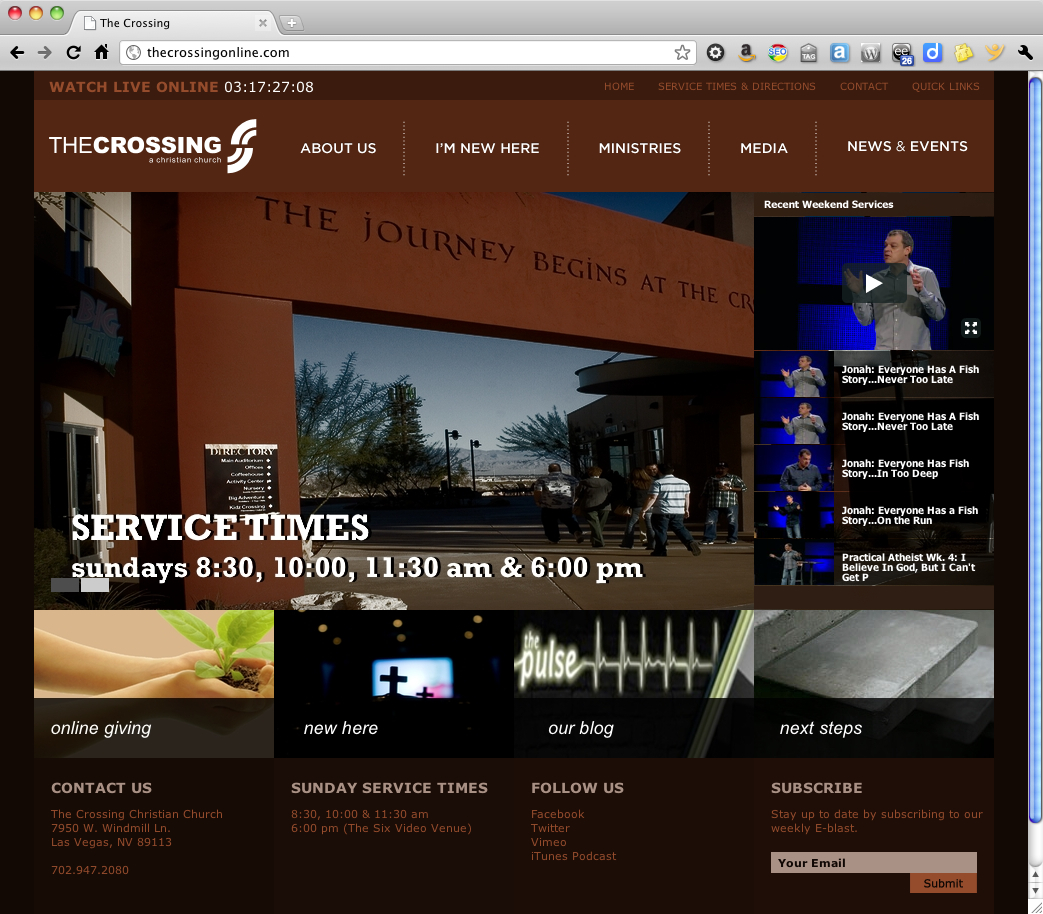
Most people, when they think of WordPress, assume it’s for hobbyists and bloggers, and the the design will look like a template. The Crossing proves this assumption wrong. The website isn’t a blog in the usual sense, but a great example of how WordPress can be used for pure content management with a unique style of its own.

For this project, my friends at PlainJoe Studios created the site design and architecture, with complete Photoshop mockups. Based on their design, I built a custom WordPress child theme using the StudioPress Genesis framework. The final product includes some great features, including a widgetized homepage, a dynamic video gallery fed via Vimeo, and slick access to the site map via the Quick Links in the header (give it a try!).

Best of all, the client can easily manage their own website content. And that is something to give praise for.

WordPress — it’s not just for blogging.

Do you need a website that works for you (instead of against you)? I can help. I have a network of design and developer resources that team together to deliver dynamic, high-performance websites. Our team is known as Room Five, and we’re here to help. Contact me for details.


Posted on 9 Comments

Favorite iPhone Apps for Photography

I’ve always loved photography. When I was younger, I used a Konica SLR (even lugging that heavy thing over 200 miles on the John Muir Trail back in 1980). When digital cameras appeared on the scene, I quickly dove in. The ability to shoot… and shoot… and shoot as many photos as I wanted without worrying about film or developing costs blew my mind.

For years, I favored Canon’s compact point-and-shoot line. They are fast and produce great shots. This is exactly what I used last year when I hiked the John Muir Trail, and it served me well.

But more and more, I find myself using my iPhone for photography. It’s convenient (I always have my phone nearby) and coupled with the wonderful photo apps for the iPhone, it’s a blast! The apps encourage experimentation and photographic “play” — which is right up my alley.

Of course, one of the problems with apps is that there are so damn many of them. How do you find the good ones? And so, I present to you my list — the good ones — the iPhone photography apps worth getting.

Instagram

Instagram is a pretty basic app, but it’s so damned fun to play with! You can snap a photo “live” with the app or retrieve one from your photo library. Instagram will ask you to scale and crop it to a square format. That’s right, all Instagram-generated images are square. You can then apply any of a number of old school film-like effects that will make your photo look like a faded old polaroid or a Kodachrome print from the ’70s. Check out a few of my Instagram photos to get an idea of what you can do with it.

The latest version adds the ability to apply an effective tilt-shift effect for creating “miniature” scenes. But where Instagram really shines is in the social aspect. You can create friends (importing from Facebook or Twitter) and view their Instagram “streams” with likes and comments much like Facebook. And you can share your Instagram creations easily. Once you configure it, with one click you can upload to Twitter, Facebook, Foursquare, Flickr, and other services.

Instagram is currently my favorite iPhone photo app, and well worth the price (FREE!).  Don’t think, just get Instagram.

Slow Shutter Cam

Slow Shutter Cam is a recent addition to my iPhone photo app toolkit, but WOW — what results! It allows you to create those really cool looking slow shutter images that normally you’d need a much fancier camera to create. You’ll need a tripod for decent results (I like the GorillaMobile for the iPhone), but it’s a lot of fun.

This shot isn’t the best example, but it was one of my first creations with Slow Shutter Cam. This is actually the local train passing by. Interesting that it captured the light but the train itself became essentially “invisible.”

This app does a great job of capturing night scenes with traffic passing by, or running water, or any number of special photographic effects where you want to capture the sense of movement. Fun stuff. It’s $0.99, and worth it. Get Slow Shutter Cam.

Pro HDR

HDR effects are easily achieved on the iPhone with this great app. It takes two photos, so it works best with a tripod and a stationary subject. But the results can be stunning. Get Pro HDR; it’s only $1.99.

Here’s an example I created with Pro HDR:

AutoStitch

The forth and final must-have photo app on my list is AutoStitch. This let’s you create panoramic images with remarkable ease. They aren’t always perfect, but they are damned good considering how easy it is. I know; I’ve used a number of desktop apps on both Windows and Mac and spent hours generating panoramas. This does the same thing, on your iPhone, in just a few minutes.

Basically you take a series of overlapping photos, turning a few degrees between each shot. Then in AutoStitch, you drag the photos into a pool and let it rip. A few minutes later, you have a panorama! AutoStitch is also just $1.99. Get it!

There you have it — four great photography apps for your iPhone. If you haven’t had a chance to experiment with any photo apps, these are a good place to start. And if you know of some other apps that I should check, leave a comment and let me know.

 

Posted on 1 Comment

Robert Scoble, Loic Le Meur and… Jeff Hester?

I introduced you to Memolane last week, and today they have opened their beta to everyone — no invite codes required (and perfectly timed to capitalize on that SXSW buzz). For me the real shock came when I looked at their homepage. Newly added is the “Featured Memolanes” section, including Robert Scoble, Loic Le Meur, and… Jeff Hester? Apparently living online has paid off. Set your timer to 15 minutes and press “Start.”

In addition to opening Memolane up (strategically timed to take advantage of SXSW), they’ve also added integration with Instagram (yay) and MySpace (yawn).

As I’ve been playing with Memolane, I’m enjoying the interface. It’s a fantastic way to peruse your digital history. You can check out my Memolane — and feel free to sign-up and add me.

Still not convinced? Check out this video introduction to Memolane.

Posted on Leave a comment

Join Me at WordCamp OC

I’ve been a huge fan of WordCamp ever since attending my first WordCamp in San Francisco back 2007. WordCamp is a great, inexpensive way to learn and network with fellow WordPress fans.

Now WordPress users in Orange County and through Southern California have the second annual WordCamp OC to look forward to. Organized by Jeffrey Zinn and Brandon Dove of PixelJar, this year’s even will be held on May 14th at Chapman University in Orange.

Look forward to seeing you there!

Read more at 2011.oc.wordcamp.org.

Posted on Leave a comment

Cutting the Cable: Nine Months Later

Last year I got fed up with my cable TV bill. I was paying about $120/month for cable TV alone! I don’t watch that much TV, yet somehow I had put up with paying for two premium channels and a package that included at least a hundred channels that I would never watch.

Just about nine months ago, I decided to cut that cable. I called Cox and asked them to discontinue both my land line phone service (which I never used) and my cable TV. It was weird, but I don’t think they really believed that I was truly canceling my regular television programming. They asked if I was switching to satellite (I wasn’t). They enticed me to stay with lower monthly rates (I didn’t). The only service I kept was their broadband Internet.

It was a calculated decision. I already had Netflix, with streaming movie capabilities. I had Xbox Live and iTunes, allowing access to still more movies and shows. I have a cable from my Mac Mini to my 47″ Visio so I can play movies or shows I’ve downloaded. Most of the programming that I cared about was available at a much lower cost.

How has it worked out?

The biggest gaps in my programming are live coverage such as news and sports. Of course, the Internet is also a great source for updates on both, but certain sporting events are just more enjoyable to watch as their played. For this, I met up with friends at a local sports pub to catch a game, and relied on Internet news sites rather than cable news for the latest happenings around the globe.

I’ve also found new sources of programming. Last fall I added a wifi-enabled Samsung Bluray player that I’ve ended up using more as a streaming device than for playing discs. I use it regularly with Hulu Plus, Vudu, Netflix, Vimeo and Pandora.

Xbox Live added ESPN3 back in November 2010. So far, this hasn’t been much use to me. They don’t include any NFL games; my primary sport. But I have used it to watch tennis.

Still, there are times when I miss turning on the TV to catch the local news as I get ready to start my day. Not a big deal, but missed. For a while, ivi TV looked promising. They offered streaming of broadcast TV channels from major cities including New York and Los Angeles. Unfortunately the networks have tied them up in the courts and shut down most of the programming they once had.

For now, my experiment in cutting the cable has been a huge success. I’ve saved about $1,000 over the past nine months, even after you add in my Hulu Plus subscription. If you’re comfortable with streaming and downloading programming, you may want to consider joining the ranks of cable cutters, too.

Have you cut the cord? If so, what has your experience been? If not, what’s holding you back?

Posted on 3 Comments

The Genuine Article

Jeff Turner shared his thoughts on transparency this week, and spurred me to tackle a subject that I’ve been mulling over for a long while.

There’s a lot that’s been said about transparency, authenticity, honesty and being genuine. Social media experts will advise you that if you represent a company of any size, you can tweet, comment and post, but you need to do so with a personal voice. Generally, it’s true; people can smell bullshit from a mile away, especially the glossy, corporate marketing-speak kind.

What people respect and are attracted to is the real deal; people who are comfortable being themselves. So what does that mean.

Inevitably in these discussions about authenticity, someone will bring up a blogger like Dooce — aka Heather B. Armstrong. The New York Times declared Heather the “Queen of the Mommy Bloggers” for her ability to parlay her blog into a full-time business with three employees. Heather’s trademark style is brash. She lays it all out there, whatever is on her mind. You get profanity. Struggles with substances. Martial strife. And good stuff, too.

So should all bloggers should be similarly “transparent” about their lives? Hell no! But we must be genuine. What does that look like? It can be confusing, because people toss around these words as if they were interchangeable:

  • Transparency implies openness, communication and accountability. It does not imply (ore require) that you share every little detail and thought that races around between your ears.
  • Authenticity is the quality of being believable or trustworthy.
  • Honesty is simply being truthful. As with transparency, you can be truthful without oversharing.
  • Genuine means “possessing the claimed or attributed character, quality, or origin; not counterfeit.”

While they are all cousins, they are not the same.

Clearly (hah!) transparency involves being genuine, but the degree of transparency you is a factor of how comfortable you are sharing your innermost self. An obvious one: do you feel “safe” sharing your social security number on your blog? Most people will agree that is not a level of transparency they aspire to.

The goal then is not 100% transparency, but a comfortable degree of translucency.

Be genuine. Be yourself.

Over time, people will know who you are, what you really stand for, and whether they can really trust you.

Posted on 5 Comments

Seth Godin Pokes the Box

Last night I had the pleasure of hearing best selling author Seth Godin speak at this month’s LinkedOC event in Segerstrom Hall. Godin’s talk centered around the subject of his latest book, Poke the Box, in which he encourages us to take initiative; to instigate; to GO! Writes Godin:

“Imagine that the world had no middlemen, no publishers, no bosses, no HR folks, no one telling you what you couldn’t do.

If you lived in that world, what would you do?

Go. Do that.”

Godin is a terrific speaker, very relaxed and personable as he skillfully balances enlightenment and entertainment. I won’t repeat his talk (Ricardo Bueno put together a great recap), as you can get even more from his book. What really intrigued me was the Q&A afterwards, particularly when he described his Domino Project.

What is the Domino Project?

The question came from the audience after his talk. Seth spoke passionately about how he felt the publishing industry has lost it’s way. “Bookstores are dead,” Godin boldly declares. Not dying. Not hurting. Just dead. So he partnered with Amazon, who happens to sell a few books directly to consumers, and has some interesting data about those sales.

From Amazon, Godin learned that a majority of sales of his last best seller were to customers who bought in multiples — two, three, five or more copies of his book. Godin’s books are unique not only for their content, but their form factor. They are small, compact packages that can easily be absorbed in a long plane flight and passed on to a friend, making them well-suited for multiple purchases.

The Domino Project changes the formula. Instead of publishers selling to bookstores (who aren’t really the customer), Godin leverages Amazon to sell directly to consumers. Instead of one size fits all, you can order Poke the Box in no less than ten different formats and packages. You can get the Kindle version for a mere $4.99, or a pack of 52 hardcover versions for $341 (and everything in-between).

Godin even points out the the front cover of the book has no text on it. No title, author or marketing speak. Just a clever, retro-looking chap who looks excited. A colleague or friend who spies it sitting on your table is compelled to inquire “what is this?” Godin’s austere cover is irresistible book bait.

It’s still to early to tell whether Godin’s gamble will be a success, but I’m betting he’s at least on the right track. He says that early sales figures are 5x that of his last best-selling book.

With his Domino Project, Seth Godin is practicing what he preaches in Poke the Box.

What box are you poking?