I usually reserve the fun stuff for weekends, but this was too hot to wait. If you’ve got an iPhone and like to play around with photos, you’ve got to check out the ToonPAINT app. You can use the camera or open an image from your photo gallery and it converts it to a comic-book styled image. You’ve seen this style before. It first showed up in the Charles Schwab commercials, and then soon after in the film adaptation of Philip K Dick’s A Scanner Darkly (appropriately set in Orange County).
ToonPAINT does a damn good job without any manipulation. If you want, you can colorize the images afterwards, but even without doing so, you get some pretty interesting results.
Bethany and Dan, comic book style
Here’s a quick test I ran with a photo of my daughter Bethany and my eldest son Dan, taken a few years ago in Laguna Beach.
Other than cropping the “toon” version a little tighter, I didn’t do any further editing to the generated image. Not bad for a completely automated conversion!
You can get ToonPAINT here. It’s not free, but it’s worth the 2 bucks for the entertainment value if nothing else.
If you give it a try, post a link to your experiments in the comments below.
Last month, my grandmother passed away at the age of 95. Ruth Vanderploeg was in amazingly good health, living independently in the home she and my grandpa had shared for over three decades, walking regularly, entertaining guests and even teaching English. She suffered a massive stroke, and never regained consciousness. She passed away a few days later. She was a terrific woman, and I will always remember the difference she made in my life.
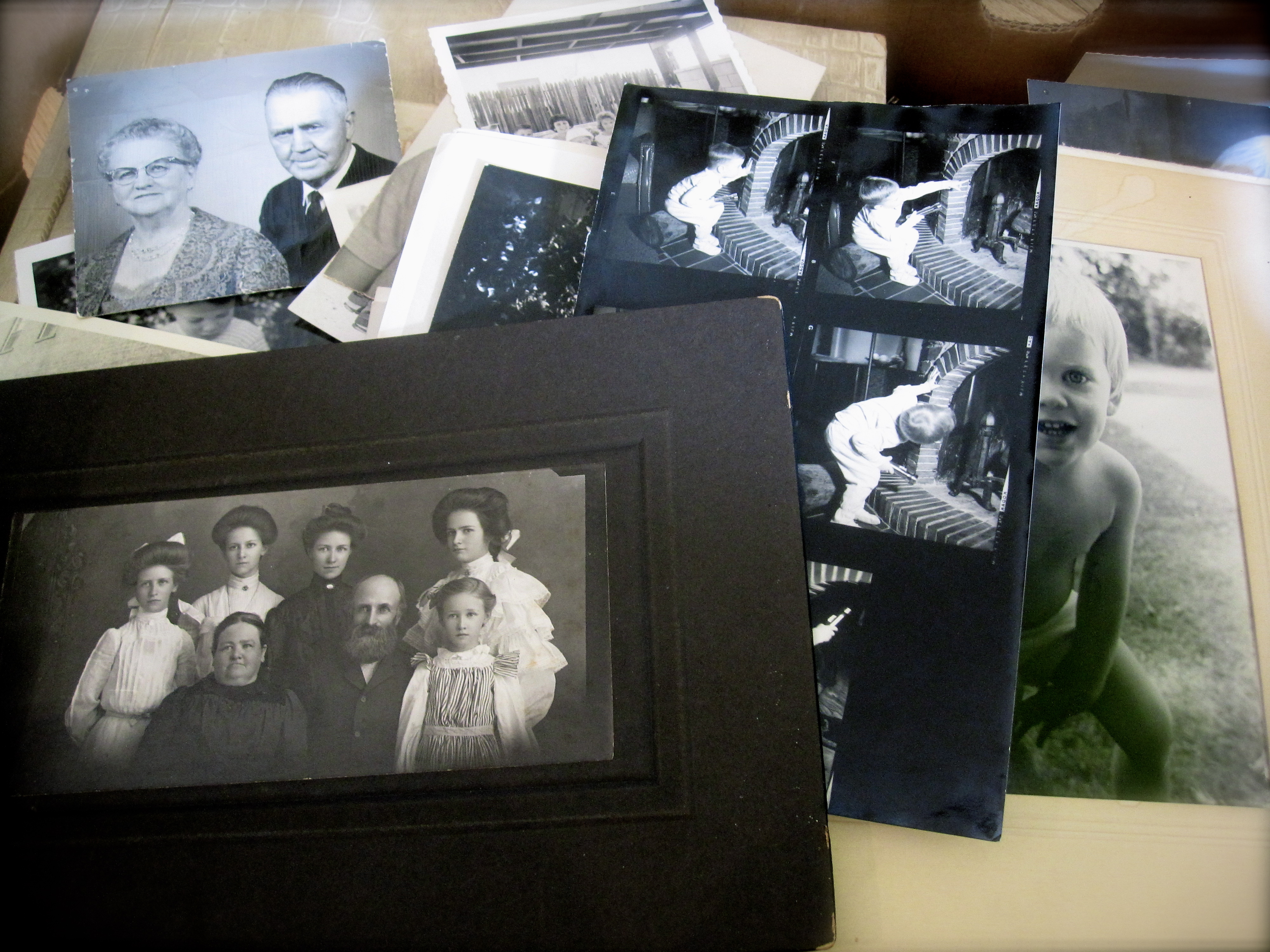
As our family gathered and began taking care of the house and belongings, we discussed what to do with the boxes of old photos. There were some terrific old photos of family and friends, some of them over 100 years old. A rich tapestry of family history that really belonged to all of us. We split up a few of the obvious ones — I got a lot of pictures from my childhood — and I suggested that for many of the others, we could share them online.
A big box of photos to scan
Why share them online?
First, our family is literally spread all over the world. My mom is in China, my brother in Denver, my kids in Tennessee, New York City and Maine. Aunt Mary lives in New Mexico, Pat lives in Eureka… you get the picture.
Secondly, in many of the photos we couldn’t place the location, date or even some of the people in them. Posting them online allowed the entire family to share their knowledge. “Oh yeah, that’s Uncle Alf!” or “That one’s from 1952!”
Finally, sharing them online would allow everyone a chance to download and print whatever they wanted, whenever they wanted. By sharing them on the web, we all have a copy.
How to Create a Photo Archive Online
The author in 1977. Nice afro!
One of the first things I had to do was decide where to share the photos. I considered Flickr and Facebook, but not everyone has (or wants) accounts on those platforms, and it was important that everyone be able to add comments. So I decided to create a photoblog using WordPress (which is free). I’ll be building it on the StudioPress Genesis framework (I already have a developer license) and starting with the Landscape child theme. I’m hosting it on my own server, and I’ll be creating a mailing list using MailChimp (also free up to 1,000 subscribers). And I’ll scan and upload several new images every week, along with an email update to the friends and family that have subscribed.
My plan is to have one photo per post, though I may group photos from a single event on the same post. Each post will be tagged with relevant names, places and dates. This way you could easily retrieve all photos of Grandma Moeller, or from a specific year or place.
Have you created a photoblog? Got any advice or tips to share? Leave a comment and pass them on. And I’ll be sharing updates on my progress as I get further into the project.
Flump is an Adobe AIR application that lets you download all the public photos from any Flickr user. Written by a couple of Adobe employees — Lee Brimelow and Mike Chambers — Flump makes it easy to backup your photos for archival purposes — useful if Flickr ever looses your stuff.
Personally, I have grown to trust Flickr for all my photos, and often I don’t even bother keeping local copies. This trust in “the cloud” sometimes worries me, especially when I hear the horror stories of people losing their Gmail inbox or worse. Flump fills the gap and makes it easy to create a nice clean backup to my local drive, where I can then burn it to DVD and file it away.
This has been a long time coming. Flickr now allows video uploads. They show up in your photostream alongside regular photos. They can even be played right in thumbnail mode and embedded on your own website, like this:
Adobe Photoshop has long been recognized as the premier tool for image and graphics editing, but the cost was prohibitive for many people. Adobe first offered a slimmed-down version of Photoshop at a lower cost, but now you can use Photoshop for free! Zero. Zip. Nada. Nothing.
Adobe has introduced Photoshop Express, a free, web-based version of Photoshop. Photoshop Express is available now in beta form, and apart from the required Flash 9 plug-in (also free), you don’t need to install any software on your PC. This means Photoshop Express will run happily on your Mac, your Windows PC or even your Linux computer.
On top of that, Adobe is providing 2 GB of storage for your work, also free. So now you can edit images from pretty much anywhere with a PC and an Internet connection.
While graphic designers and image pros will still need the full desktop client, most people will find Photoshop Express more than meets their needs. Even pros will find it useful for those occasions when their own PC is not nearby.
And it’ll probably make law-abiding citizens out of a lot of would-be pirates.
Animoto is a terrific service that creates video presentations combining photos and music with some great visual effects and very little effort on your part. The beauty of Animoto is that it works with the photos you probably have already uploaded. Animoto can retrieve your photos from Flickr, facebook, smugmug, Picasa or photobucket. You select the photos you want to use, including any special photos you would like to highlight in the video.
For music, you can upload your own or choose from a very nice selection in a variety of genres. For the video above, I chose one of the Indie Rock selections.
That’s about it! Animoto then creates your video automatically. When it’s done, you’ll have a code you can use to embed it on your own blog, or Animoto will automatically embed your video on facebook, myspace, blogger and several other sites. You can even automatically upload the video to YouTube, or download a Quicktime version to your computer.
All of this is free… as long as you’re happy to limit your videos to 30 seconds in length. Longer videos can be created at a cost of $3 each, or you can pay $30 for an annual subscription that let’s you create an unlimited number of “full-length” videos.
The results speak for themself. I was pleased, given the amount of effort that went into it (almost zero). Check out Animoto.






 Adobe Photoshop has long been recognized as the premier tool for image and graphics editing, but the cost was prohibitive for many people. Adobe first offered a slimmed-down version of Photoshop at a lower cost, but now you can use Photoshop for free! Zero. Zip. Nada. Nothing.

