There are over 500 million Facebook users. Of these, 200 million regularly and actively access Facebook from a mobile device. If you are providing a mobile version of your website, you are screwing up a huge opportunity. Fortunately, if you use WordPress for your website, there is good news. There are several great ways to add basic mobile support to a WordPress-powered website with very little effort.
Assuming you care about the huge number of people who might want to visit your site from their mobile device, there are two important issues that warrant some thought.
Keep it Light
Back in the early days of the Internet, most people used dial-up access. The rule of thumb for websites was to keep the total size of your page to less than 100 KB so that it could load reasonably quickly for dial-up users. Today, most computers connect via some form of broadband, and–according to Google–the average page size has ballooned to over 300 KB or more. While this works great for most fast broadband connections, mobile users may have data access speeds that are much slower. On top of that, many times they are paying by the drink. Some mobile providers charge based on how much data usage you slurp, so the greater your usage, the bigger bite they take out of your wallet. And don’t forget about data roaming!
Make it Useful
The mobile version of your website should not be a replica of the desktop experience. Just because your site can be displayed on an iPhone, doesn’t mean it’s mobile-ready. A mobile user has very different needs.
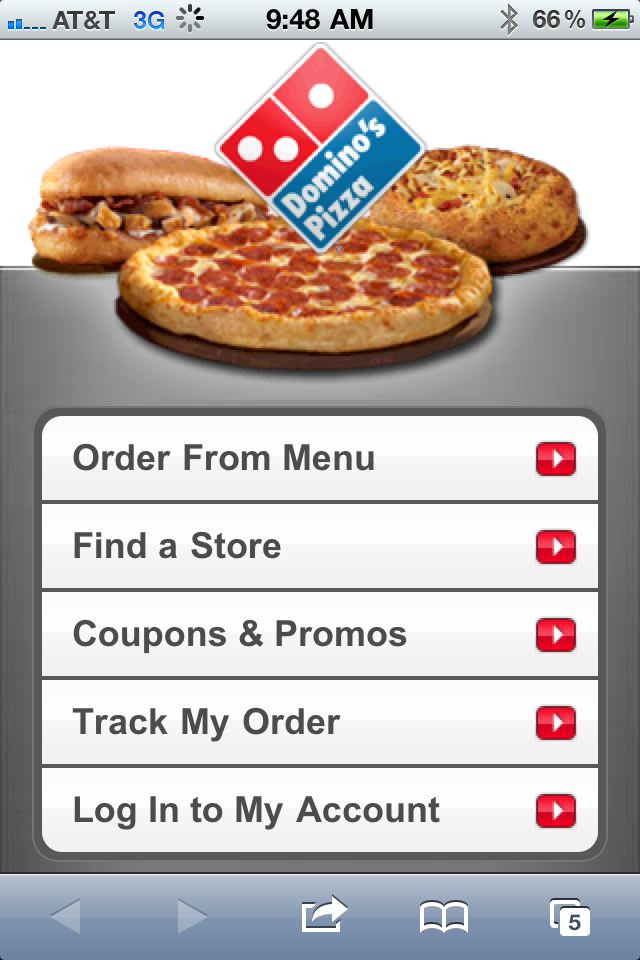
Domino’s Pizza provides a great illustration of this. Visit the main Domino’s website on your computer and you can find a wealth of information. There are menus, online ordering, location information, nutritional info and even information about the corporation. Almost anything you want to know about Domino’s can be found on the site.


What are the primary objectives for the mobile visitor? How do they differ from the person sitting at a computer? For Domino’s, they want to make it easy for someone on a mobile device to place an order and find a store. You don’t get all the bells and whistles of the full website, just the key activities that Domino’s has found most mobile users want.
Taking Your WordPress-powered Site Mobile
It is said there are a thousand ways to skin a cat. There are probably even more ways to provide mobile support for your WordPress-powered website. I’m not even going to attempt to cover them all, but I will point out a few quick and relatively easy solutions. Essentially the options fall into one of three categories:
- Roll your own. You can create a mobile CSS file that scales down the design and content for mobile users. This really isn’t too hard, but it does require some technical knowledge of CSS. I won’t be covering this– instead I’m going to focus on the easier solutions.
- Mobile Plugins/Themes. There are WordPress themes or plugins designed specifically to provide mobile support.
Mobile-izing WordPress
One of the easiest ways to add a mobile version of your self-hosted WordPress site is with the WPtouch plugin. WPtouch is available in both free and commercial versions. It provides a much-improved mobile interface on iPhone, iPod touch, Android, Opera Mini, Palm Pre, Samsung touch and BlackBerry Storm/Torch mobile devices.
I use WPtouch on several of my sites, including socalhiker.net and here at www.jeffhester.net.
The easiest way to try the free version is simply to add a new plugin via the WordPress admin console or download from here in the WordPress.org plugin directory.

As you see in the screenshots above, the mobile version generated with WPtouch looks considerably different from the full site. The benefit to the mobile user is that it loads quickly, gives them something with an interface optimized for their device, and still gives them access to the content.
Of course, you can customize it further with your branding and colors. As time permits, I’ll do that as well. But without a lot of fuss or effort, you get something very usable on a mobile device.
There are many other good options including Mobify. VisionWidget has a more comprehensive overview if you’d like to see some alternatives.
Testing Mobile Support
Chances are, you already have a mobile phone or device to test on, but how do you test your mobile site on a variety of devices without buying them all? There isn’t a single option that works well for this, but CrossBrowserTesting will let you see what your site looks like on Android, iPhone and iPad devices. It’s a commercial service with a free trial.
For even more mobile options, check out PerfectoMobile. They focus exclusively on mobile devices, but include a much larger range.
Potential Problems
One obvious design difference between a typical site and a mobile version is that it won’t typically have a sidebar. If you rely on the sidebar for navigation or other functionality, you’ll need to provide another solution with your mobile version.
Another common issue will is Flash. Apple devices like the iPhone, iPod Touch and iPad don’t support Flash, and many video sites use Flash players. The mobile Safari browser on Apple devices will support HTML5 video, but you may need to tweak your embed technique to specify this.
Some of the mobile systems like WPtouch have issues with third-party comment systems like Disqus, Intense Debate or Echo. Usually this is not a showstopper, but if you use one of these systems, plan on doing some additional testing.
Summing it All Up
This isn’t meant to be an exhaustive list of options, but my own preference. Hopefully this whets your appetite for providing mobile support on your websites.
Got a better solution? Share your knowledge! Leave a comment below.