Posted on 4 Comments

What is Memolane?

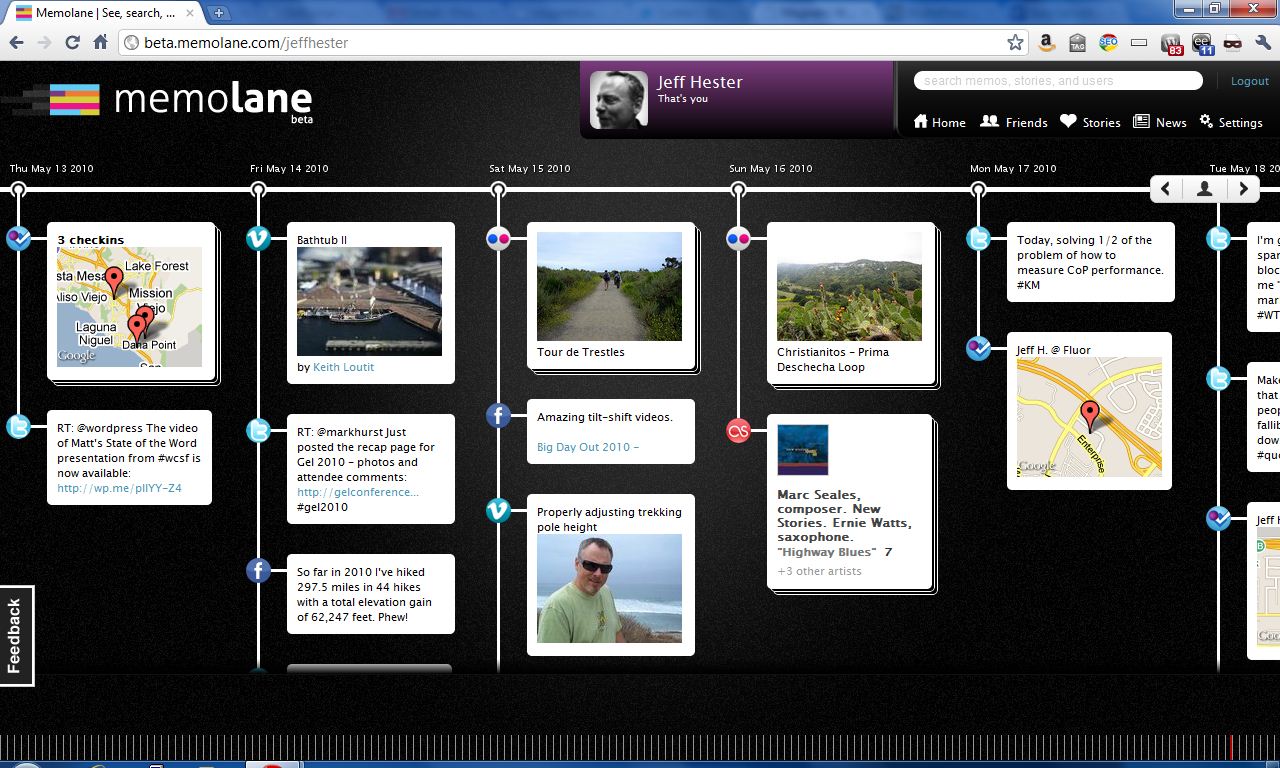
It’s been said that everything you do or say on the Internet is there for ever. But even with all the various websites and services we use, it’s still not easy to collect all those tweets, posts, photos and other artifacts in a organized way. Flavors.me does a fair job of aggregating this data, and Facebook is doing more and more aggregation. But neither of these attempt to take a historical look back at your activity. This is where Memolane attempts to fill the gap, creating a digital timeline of your contributions.

Currently in beta, Memolane allows users to configure a variety of popular services and then automatically collects them in a timeline. The services supported include Facebook, Twitter, Flickr, Last.fm, Picasa, RSS feeds, YouTube, Vimeo, Foursquare and TripIt, with support for additional services promised.

The results are pretty amazing. You can scroll back through time and see where you checked in, what you tweeted, what photos you posted and so on. Across the bottom of the screen is a series of vertical lines that represent a granular view of time that lets you quickly scroll through years of data. Slick!

You have control over whether you share this publicly or not, but I noticed some glitches. For instance, if you have photos marked private on Flickr, they still come over into your Memolane timeline. Depending on your Memonlane settings, they may be visible in your “lane” regardless of your Flickr settings. Not great, but then it’s still in beta.

If you’re interested, you can check out my Memolane here.

UPDATE: Beta Invites

Memolane Community Manager Meghan Krane graciously gave me an invite code to share with you (thanks, Meghan!). If you’d like to try Memolane for yourself, sign-up here using the invite code “hester”.


Posted on 6 Comments

Social Media and Knowledge Management

Social media is often cast as being at odds with enterprise initiatives such as knowledge management. There is a sense that as people embrace and use social media tools like Twitter, Yammer, LinkedIn and Quora, the enterprise loses control over their knowledge. While this is certainly true, it’s also nothing new. There have always been and always will be opportunities and reasons to search the Internet vs searching the Intranet; for participating in an Internet discussion group vs. one in your enterprise community; and for leveraging external wisdom vs. known internal resources.

The subject of this week’s KMers.org tweet chat emphasized this tension: Corporate Social Media vs. Intranets. The implication is that social media and knowledge management are at odds and one is destined to be the solitary victor.

Reality Check.

Social media and knowledge management aren’t at odds at all. In fact, the most successful knowledge management systems embrace social media, but with a business mindset. The smart KM implementations leverage blogs, subscriptions, communities, discussion forums, and member profiles. They tie it together with search in a single working environment. And they look for opportunities to tie in other tools to streamline knowledge sharing — everything from instant messaging (i.e. Sametime) to micro-blogging (i.e. Yammer).

A few of the comments that really stuck out in our discussion today bear this out. We were asked for tips on optimizing the integration between social media applications and intranets. Here are a few notable responses:

[blackbirdpie url=”http://twitter.com/#!/TKBeard/status/40101729278246912″]

Tammy Bearden hits the nail on the head: it all starts with people.

[blackbirdpie url=”http://twitter.com/#!/stangarfield/status/40103103382429696″]

I like Stan Garfield’s advice to meet people where they are, which for many is still the email inbox.I’ve found the ability to subscribe and get email notifications to be an invaluable tool for engaging the workforce. I would even say it’s essential, and we’ve found it to be a tremendous attraction at Fluor.

[blackbirdpie url=”http://twitter.com/#!/BarbaraFillip/status/40102879041687552″]

Barbara Fillip reminds us to take the member eye view. Remove barriers to participation, where possible. Single sign-on is just one example.

Thanks to Stan Garfield, Liz Williams, Tom Menke, Ryan McCleadSean Brady, Tammy Bearden, Antoon van het Erve,  Matthew Loxton, Barbara Fillip, and the other participants who shared their knowledge and insight. You can read the entire tweet chat transcript online, as well as check the schedule of upcoming discussions on KMers.org. We gather via Twitter every Tuesday at noon Eastern time. If you’re a KM professional, you should be a part of the discussion.

Posted on Leave a comment

Using Google Sites for wiki-style collaboration

Google has added yet another application to the Google Apps suite. Google Sites gives you the ability to create collaborative workspaces on-the-fly, at no cost. If you’ve got a Google Apps account, you’ll be able to create an unlimited number of these sites. You can restrict access to specific users, open it up to all users from your domain, or make the site entirely public.

Anyone with proper permission can go in and make edits or create new pages, just like your typical wiki. In addition, you can add Google Widgets, Google Docs and a number of other pre-built tools.

Many analysts, including Michael Arrington at Techcrunch, are speculating that Google Sites is intended to compete with Microsoft Sharepoint.

Personally, I don’t see this as a Sharepoint killer, not because it lacks features, but because the large enterprises that typically use Sharepoint are too security-conscious to trust their family jewels to someone outside the firewall. Where Google Sites fits nicely is for small organizations, ad-hoc teams, communities and other groups without either the resources nor the need for an internally hosted solution.

I’m doing some testing with my crew at BigBlueBall and some of the projects we’re working on, and it looks promising. Google Sites is similar to a wiki in that anyone with permission can edit a page or create new pages, and the revision history is saved for reference. Where it’s different is that it uses a much friendlier design environment rather than wiki-tags. It’s not quite WYSIWYG, but it’s fairly easy to grasp for anyone who knows their way around the web.

Posted on Leave a comment

The Newbie’s Guide to Twitter

Rafe Needleman at Webware has written a great introduction to Twitter titled the Newbie’s Guide to Twitter. If you’re curious about Twitter, Needleman provides a pretty good overview. He compare’s it too Google’s Dodgeball service, but easier to use.

Personally, I think Jaiku is the better Twitterer. It reads everything, including my new del.icio.us tags, Flickr photos, tunes played and more. As someone over there tweets: “Twitter is so March 2007…” Mashable even pokes fun at the buzz with the Evolution of Blogging (the cat version).

Check’em out, and you can follow me either here on Twitter, or there on Jaiku.

Posted on 11 Comments

Web 2.0 Logo Madness

101793493_de7c112c42_o

Thanks to Ludwig Gatzke for photoshopping this wonderful collection of logos. This Part II image includes a bunch of new Web 2.0-ish companies that were missed in the first iteration, including (in alphabetical order):

30daytags, 3bubbles, 43 People, 43deals, 43Places, 8by1, 9rules Network, AidPage, AjaxWhois.com, Amazon’s Mechanical Turk, askeet!, Asoboo, Attensa, AttentionTrust.org, Avvenu, BitBomb, Bitty, BlinkList, Blinksale, blo.gs, BlogBridge, Blogdigger, BlogMarks, blogSpirit, Blogtronix, Browster, Bryght, BubbleShare, BuddyMarks, Bunchball.com, ButterFly, Buzznet, CalendarHub, Campaign Monitor, Campfire, Central Desktop, Chuquet, Citadel, claimID, ClickCaster, CLOSO.com, Cloudalicious, Clusty, co.mments, coComment, Consumatin, Current, CustomScoop, Dabble.com, Diggdot.us, Dodgeball, Doostang, Douban, Dropcash, DropSend, EchoSign, Edgeio, egorrss, elgg, eMessenger, eSnips, Etsy, Eurekster Swicki, Eventful, EventSniper, EvolvePoint, Favorville, Feed Pile, Feed2Podcast, FeedBlitz, FeedButler, FeedFeeds, FeedLounge, Feedpath, FeedPing.com, FeedXs, Flock, Fluxiom, Fold, Fotki, FotoFlix, Friendster, Fuzz, GiveMeaning, Glendor Showcase, Gliffy, GooTodo, Goovite, Gravatar, Grokker, hanzo:web, HipCal, Hubpages, IceRocket, Immedi.at, Inbox.com, Indeed, iNetWord, iOWEYOU, ispott, Jamendo, Jobazaar, Joyent, Judy’s Book, Jyve, Kaboodle, Kajeet, Kosmix.com, Kratia, Krugle, Kulando, LibraryThing, LifeLogger, LifeType, LinkedIn, Listal, LiveJournal, Loomia, Lovento, Mabber, Magnoto, MailBigFile, Meetro, Megite, mightyv, Mint, Mofile, Mologogo, Mooflex, Muiso, Multiply, My Tickler File, MyBlogLog, MyEmail.com, MyMe, MyProgs, MyStickies, Near-Time, Newroo, NewsIsFree, NewsMob, Nooked, NowPublic, Odeo, Ondergrond, openBC, OpenID, Orkut, Pageflakes, PAGUNA, Pbwiki, Peerflix, Performancing, Photobucket, Photocase , PicPix, Placeopedia, Plum, Plurn, Podbop, Podserve, Podtrac, PreFound, Prosper, PureVolume, putfwd.com, Qumana, Rabble, RateItAll, RawSugar, Readio, ReminderFeed, Revver, Rojo, Rrove, RSS MAD, Seekum, SendSpace, Sharpcast, Shutterbook, SimpleTicket, Six Apart, Skype, Slawesome, Slide, Socialtext, Sonr, Sphere, Sproutit, Spy Media, Squeet, STICKAM, Stickis, StikiPad, Surf Tail, SWABBA , Swagroll, Sxip, Tagalag, TagCloud, Tagzania, Talk Digger, Talkr, Tangler, Textamerica, The Form Assembly, ThePort Network, ThinkFree Office Online, TimeTracker, TitleZ, TracksLife, TRACTIS , TravBuddy, Trulia, Turn, Userplane, V4S, Video Bomb, VideoEgg, Vongo, Wallop, Weblogs, Inc., Weblogs Work, WideWord, Wikalong, WikiMatrix, Wikispaces, Windows Live, Wists, WordPress, Xanga, Xmail Hard Drive, YackPack, Yahoo! 360°, Yellowikis, YouSendIt, Zaadz, Zingee, Zipingo, Zoho, Zoho Chat, ZoomTags, Zooomr, and Zopa.

Part 2 takes a more liberal view of what is Web 2.0 (is there a conservative view?), choosing to include Web 2.0 applications, products and websites rather than companies.

A few things struck me as I looked at these names. First, it’s probably bad karma to use the word “bubble” in your Web 2.0 startup. Second, there are a lot of companies that made the picture mostly because they had a logo, and Ludwig was kind enough to include them. They really don’t rate such attention.

So what companies are worth your attention? You tell me. Which of these new ideas, if any, strike a nerve with you? Have you used any of them?

Posted on 2 Comments

Yahoo! Acquires WebJay (and a KM digression)

Webjay logoO’reilly Radar reports that Yahoo! has made another acquisition in their drive to transform the company’s web properties into a Web 2.0 über-community. This time it’s the music playlist community Webjay created by Lucas Gonze.

Yahoo! seems determined to be a player in the Web 2.0 world, and they just might succeed.

danah boyd writes:

I often hear people talking about how Yahoo! is buying up Web2.0, but i don’t think it’s just that. It’s not only about tagging, social bookmarking, sharing, etc. It’s about rethinking the innovation process when handling social technologies. Take a look at some of the characters recently hired/acquired – Caterina Fake, Stewart Butterfield, Joshua Schachter, Andy Baio, Cameron Marlow, Chad Dickerson, Tom Coates… These aren’t even your typical Web2.0 crowd – these are creatives with attitude who have no problem telling corporate what they think and pushing for changes that they feel are essential.

What is the glue that holds all these many seemingly disjointed pieces together (Flickr, del.icio.us, Webjay, etc.)? The people, first of all. People with innovative ideas and the drive to express them. What about from the perspective of the community member? Well, there’s authentication, something that Yahoo! can help unify. There’s commenting and discussion. And there is tagging.

A KM Digression
I had a conversation last week with Darryl, Randy and Kevin about tagging. Not the folksonomy-style tagging familiar in the Web 2.0 world, but old-school taxonomy. Specifically, how much emphasis structured taxonomy (i.e. tagging with a predefined vocabulary) should have in an enterprise knowledge management environment, and whether there is a place for folksonomy in such an environment.

People clearly “get” the value of tagging. As they use web sites like Flickr, del.icio.us and Last.fm, they see firsthand how tags add value on both a personal and a community level. The debate is whether free-form tagging can apply inside the corporate firewall. I believe there’s a place for both. Structured tagging (taxonomy via vocabulary) by knowledge managers; folksonomy tagging by everyone else. Imagine being able to see three levels of tag clouds: enterprise, community, and personal. At a glance you would see what matters most at each level. Color coding could make it more revealing. Corporate tags (vocabulary) gets green; community tags get grey; personal tags get blue.

Are you with me?

Posted on 1 Comment

Yahoo Maps Leapfrogs Google

I’ve been a big fan of Google Maps ever since it’s public release. The graphics are great. The ability to pan is cool. The API makes for some really neat mashups. Yes, Google Maps are fabulous, but the beta of Yahoo Maps is better.

Yahoo Maps BetaIf you’ve used Yahoo Maps before, the “old” service is still the default, but the beta is open and available to anyone.

Why do I like the new Yahoo Maps?
The Yahoo Maps beta is a lot like Google Maps. The map graphics have the same quality. You can click-and-drag to dynamically pan. Both Google and Yahoo have published APIs for extending their map services through mashups. Zooming is actually a bit cooler on Yahoo — with an animated zoom effect.

But there are three things that really set the Yahoo Maps beta apart from Google Maps.

  1. Birdseye View – After using CAD programs like AutoCAD and Microstation for many years, I’ve grown accustomed to the birdseye “finder” that gives you a small thumbnail view of the larger area, with the current view highlighted. Yahoo has done a very nice job of porting this functionality (very appropriately) to their maps. You can scroll by the old click-and-drag panning, or by clicking and dragging the highlighted area withing the birdseye window. Sweet.
  2. Find on Map – Google lets you search for local businesses and locates them on the map, but Yahoo adds commonly used categories for drill-down navigation as an option to free-form search. A nice touch, since not everyone is comfortable with search (as I’m constantly reminded in my KM work).
  3. Real-time Traffic Data – The real-time traffic data is the icing on the cake. Living and working in Southern California, avoiding traffic is an important part of my life. Sure, there are other websites that provide traffic data, but none of them are as slick and easy-to-use as the Yahoo Maps beta.

Now this beta is really a true beta… it’s not quite ready for prime time. It loads slowly, and is sometimes finicky (as true beta software often is). But it’s reliable enough that I now prefer to use it over Google Maps.

Check it out: Yahoo! Maps Beta