Posted on 3 Comments

Mobile Support for WordPress

There are over 500 million Facebook users. Of these, 200 million regularly and actively access Facebook from a mobile device. If you are providing a mobile version of your website, you are screwing up a huge opportunity. Fortunately, if you use WordPress for your website, there is good news. There are several great ways to add basic mobile support to a WordPress-powered website with very little effort.

Assuming you care about the huge number of people who might want to visit your site from their mobile device, there are two important issues that warrant some thought.

Keep it Light

Back in the early days of the Internet, most people used dial-up access. The rule of thumb for websites was to keep the total size of  your page to less than 100 KB so that it could load reasonably quickly for dial-up users. Today, most computers connect via some form of broadband, and–according to Google–the average page size has ballooned to over 300 KB or more. While this works great for most fast broadband connections, mobile users may have data access speeds that are much slower. On top of that, many times they are paying by the drink. Some mobile providers charge based on how much data usage you slurp, so the greater your usage, the bigger bite they take out of your wallet. And don’t forget about data roaming!

Make it Useful

The mobile version of your website should not be a replica of the desktop experience. Just because your site can be displayed on an iPhone, doesn’t mean it’s mobile-ready. A mobile user has very different needs.

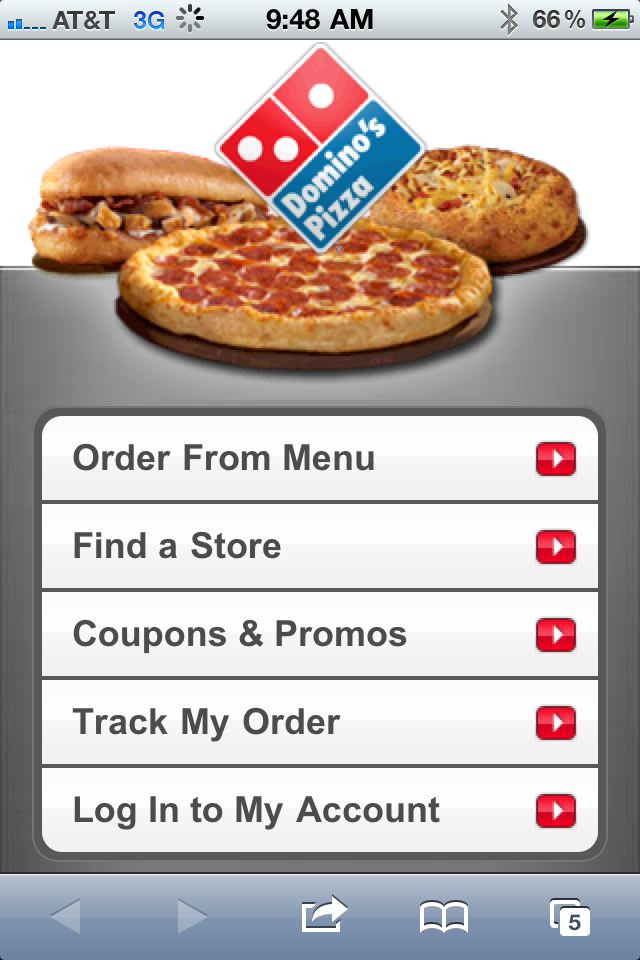
Domino’s Pizza provides a great illustration of this.  Visit the main Domino’s website on your computer and you can find a wealth of information. There are menus, online ordering, location information, nutritional info and even information about the corporation. Almost anything you want to know about Domino’s can be found on the site.

What are the primary objectives for the mobile visitor? How do they differ from the person sitting at a computer? For Domino’s, they want to make it easy for someone on a mobile device to place an order and find a store. You don’t get all the bells and whistles of the full website, just the key activities that Domino’s has found most mobile users want.

Taking Your WordPress-powered Site Mobile

It is said there are a thousand ways to skin a cat. There are probably even more ways to provide mobile support for your WordPress-powered website. I’m not even going to attempt to cover them all, but I will point out a few quick and relatively easy solutions. Essentially the options fall into one of three categories:

  1. Roll your own. You can create a mobile CSS file that scales down the design and content for mobile users. This really isn’t too hard, but it does require some technical knowledge of CSS. I won’t be covering this– instead I’m going to focus on the easier solutions.
  2. Mobile Plugins/Themes. There are WordPress themes or plugins designed specifically to provide mobile support.

Mobile-izing WordPress

One of the easiest ways to add a mobile version of your self-hosted WordPress site is with the WPtouch plugin. WPtouch is available in both free and commercial versions. It provides a much-improved mobile interface on iPhone, iPod touch, Android, Opera Mini, Palm Pre, Samsung touch and BlackBerry Storm/Torch mobile devices.

I use WPtouch on several of my sites, including socalhiker.net and here at www.jeffhester.net.

The easiest way to try the free version is simply to add a new plugin via the WordPress admin console or download from here in  the WordPress.org plugin directory.

As you see in the screenshots above, the mobile version generated with WPtouch looks considerably different from the full site. The benefit to the mobile user is that it loads quickly, gives them something with an interface optimized for their device, and still gives them access to the content.

Of course, you can customize it further with your branding and colors. As time permits, I’ll do that as well. But without a lot of fuss or effort, you get something very usable on a mobile device.

There are many other good options including Mobify. VisionWidget has a more comprehensive overview if you’d like to see some alternatives.

Testing Mobile Support

Chances are, you already have a mobile phone or device to test on, but how do you test your mobile site on a variety of devices without buying them all? There isn’t a single option that works well for this, but CrossBrowserTesting will let you see what your site looks like on Android, iPhone and iPad devices. It’s a commercial service with a free trial.

For even more mobile options, check out PerfectoMobile. They focus exclusively on mobile devices, but include a much larger range.

Potential Problems

One obvious design difference between a typical site and a mobile version is that it won’t typically have a sidebar. If you rely on the sidebar for navigation or other functionality, you’ll need to provide another solution with your mobile version.

Another common issue will is Flash. Apple devices like the iPhone, iPod Touch and iPad don’t support Flash, and many video sites use Flash players. The mobile Safari browser on Apple devices will support HTML5 video, but you may need to tweak your embed technique to specify this.

Some of the mobile systems like WPtouch have issues with third-party comment systems like Disqus, Intense Debate or Echo. Usually this is not a showstopper, but if you use one of these systems, plan on doing some additional testing.

Summing it All Up

This isn’t meant to be an exhaustive list of options, but my own preference. Hopefully this whets your appetite for providing mobile support on your websites.

Got a better solution? Share your knowledge! Leave a comment  below.

Posted on 2 Comments

Expanding my Knowledge at WordCamp LA

My Saturday mornings are usually either 1) a day to sleep in after a late night Friday or 2) a day to get up early and hit the trailhead, climbing one of my favorite local mountains. Today, I broke that mold, getting up early to feed my brain at WordCamp LA.

My first WordCamp experience was at WordCamp San Francisco back in 2007. This past year, I worked with Brandon Dove and Jeffrey Zinn to help organize WordCamp OC. WordCamp is a great way to immerse yourself in the WordPress community and learn a lot in a short time from some really brilliant people.

Some people are put off by the thought of attending WordCamp, thinking it’s too advanced for them, but there really is something for everyone — developers, designers, bloggers and people just thinking about blogging — all of them have something to gain.

Chances are good there’s a WordCamp in your area. If you are using WordPress, or even considering using WordPress, check out the schedule of upcoming WordCamps and sign up! You’ll be glad you did.

Oh, and if we met at WordCamp LA, leave a comment or send me a tweet @jeffhester with the hashtag #wcla.

Posted on Leave a comment

Connecting at ConnectOC

This past Thursday I joined hundreds of fellow business people at the second Connect OC event. Congratulations to the organizers for a great event. I met some great people, and a lot of money was raised for Share Our Selves, a local charity battling homelessness and poverty.

If you’re in the OC area, you can learn about upcoming events from the Connect OC fan page on Facebook or by following Connect OC on Twitter.

A number of the people I met asked about my SoCal Hiker project. Please stop by, leave a comment and let me know we met at ConnectOC.

Posted on 2 Comments

Communities Behind the Firewall

Last July, I spoke at the inaugural Ignite/LA on the use of virtual communities to enable strategic knowledge sharing across the enterprise. It took a while, but the video is now online.

The Ignite format uses 20 slides which auto-advance every 15 seconds making the presentation length a total of five minutes. The next Ignite/LA will be held on Monday, June 7th in Santa Monica. You can now register online.

Posted on 2 Comments

Extra-Enterprise Knowledge Management

Knowledge management is commonly understood as an enterprise initiative, usually with the objectives of collecting, capturing and reusing knowledge and expertise within the enterprise. The rise of cloud computing, social media and free collaboration tools has made it possible for communities of like-minded people to form outside the context of the enterprise — a form of ad-hoc knowledge sharing and collaboration.

Examples of such communities abound, including (in the KM realm) KMers.org, KMwaves.org and SIKM. But you don’t need to look further than Google to find a wealth of thriving community eco-systems, many with processes for identifying experts and collecting knowledge. Easy access to collaboration tools like Twitter, Skype, blogs, wikis and Google Wave provide the underlying technology that makes such collaboration possible among participants who might otherwise never meet.

It’s reasonable to suggest that real knowledge management occurs in many of these external communities, even if it isn’t really considered KM by its participants.

In this environment, each enterprise (theoretically) has its own knowledge management methodology and systems. In addition, each external community (i.e. KMers.org) also has their own methodology and systems… and community. A professional at Partner C can collaborate and share knowledge within their own enterprise, and/or within any number of external communities. But they remain separate systems. When internal knowledge and expertise comes up short, he must repeat the process (if he’s motivated) in whatever external communities he is involved in.

Extra-Enterprise KM

What I am interested in exploring is what I’ve termed extra-enterprise knowledge management. This involves tightly coupled KM shared within a known group of enterprises, and ideally with integration to traditional intra-enterprise KM systems.

In this environment, there remain internal KM processes and tools, but with strong connections to other valued enterprises — clients, partners, suppliers and in some cases even competitors may fit the bill. The professional in Company A can begin their search for knowledge or expertise within their enterprise, but can also extend that to include the community that “lives” at the intersection of the participating enterprises. It’s KM beyond the firewall.

This happens today in small groups, and generally through personal networking (who you know). I’d like to extend this to the broader enterprise.

There are numerous obstacles and questions that must be resolved to make this a reality. There are legal and regulatory problems, technical issues, and culture clashes, each of which I will explore in the future. But extra-enterprise KM holds tremendous promise for extending and leveraging knowledge sharing and collaboration. Whatever it is called, it’s the next wave of KM.

Interested in continuing the discussion? I am moderating a Twitter chat event titled KM Beyond the Firewall at KMers.org on March 9, 2010 at noon EST.

Posted on Leave a comment

What the F**K is Social Media?

Social media has transformed our world. Facebook, Twitter, blogs, wikis, YouTube — all emphasize the power of participation. Today the web is all about community; people gathering, sharing and collaborating with others who share their interests.

If your business, web site or service is not leveraging social media, you are missing out on a huge opportunity to extend your reach. But what exactly is social media, and what can it do for you from a business perspective? The following slide show provides a clear, well-defined explanation.

Is your company using social media? How? Or why not?